Meta tag checker: title, meta description, H1 and canonical
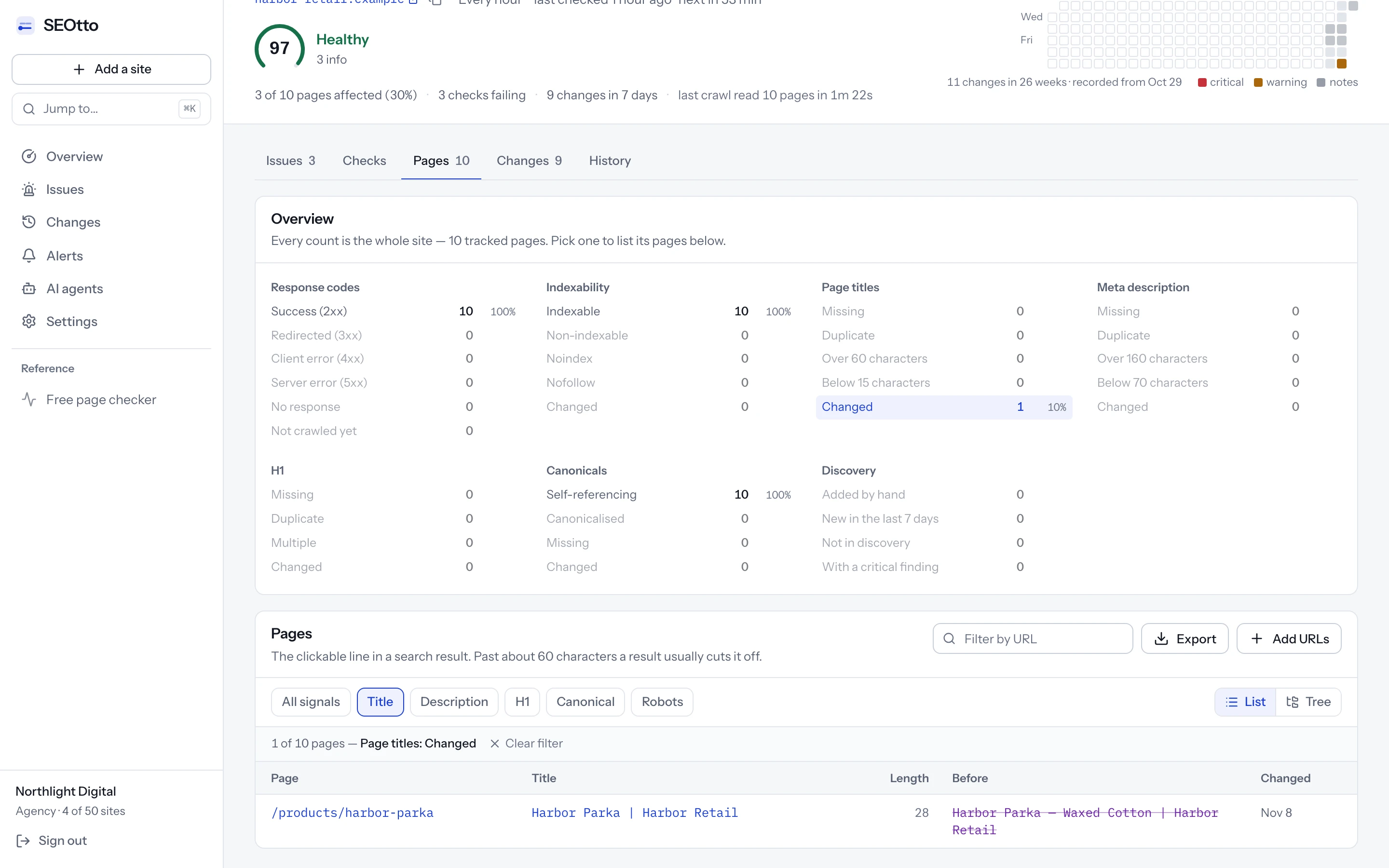
Title, meta description, H1 and canonical are saved for every page on every crawl, so a changed tag shows its old value beside the new one. Missing, duplicate and over-long tags are flagged, and so are canonicals that point elsewhere.
Paste a URL to check its title, description, H1 and canonical.
Monitoring is free for one site. Start free
Meta title and description checker.
Count the characters and preview the search result before you publish. It runs in your browser with the monitor's limits.
75 characters. Past 60, the end is usually cut off in the result.
137 characters, inside the 70–160 the rules use.
Drawn in the preview only. Nothing is fetched.
How the page would look in a result
harbor-retail.example › parka
Harbor Parka in Waxed Cotton, a Water-Resistant Rain Jacket | Harbor Retail
A waxed cotton parka with a storm hood, taped seams and a wool-lined collar. In five colours, with free repairs for the life of the coat.
Struck-through text is past the point a result usually cuts off — the title is 75 characters. Google measures pixels rather than characters, so treat this as close, not exact.
An example from Harbor Retail, a demo store. Its title runs past 60 characters, so the brand at the end is what gets cut off.
Which meta tags matter for SEO
These six decide how a page shows up in search and how its link looks when shared.
<head>
  <title>Harbor Parka, waxed cotton | Harbor Retail</title>
  <meta name="description" content="A waxed cotton parka with a storm hood, taped seams and a wool-lined collar. Free repairs for the life of the coat.">
  <link rel="canonical" href="https://harbor-retail.example/parka">
  <meta property="og:title" content="Harbor Parka, waxed cotton">
  <meta property="og:description" content="A waxed cotton parka with a storm hood and taped seams.">
  <meta property="og:image" content="https://harbor-retail.example/images/parka-1200x630.jpg">
</head>
<body>
  <h1>Harbor Parka</h1>
  …
</body>
Title tag
<title>The page's name in search results and on the browser tab. Google usually shows it as the link in a result, and writes its own from the H1 or other prominent text when the title is missing, vague or out of date.
- critical
Title tag is missing. No
<title>, or an empty one. Google writes its own title from the page instead. - warning
Title is used on more than one page. Several indexable pages share one title tag.
- note
Title is longer than the snippet allows. Over 60 characters, roughly where Google cuts a title off in search results.
- note
Title is very short. Under 15 characters, which usually means a template placeholder.
Meta description
<meta name="description">A summary of the page, shown as the snippet under the link when Google finds it describes the page better than a passage of the text. It does not change rankings. It changes what a searcher reads before choosing a result.
- warning
Meta description is missing. No meta description, so Google builds the snippet from the page body.
- note
Meta description is used on more than one page. Several indexable pages share one meta description, usually a site-wide default.
- note
Meta description length is off. Shorter than 70 or longer than 160 characters.
H1 heading
<h1>The main heading, in the body of the page. Google lists it among the sources it uses when it writes a title link of its own, so it should agree with the title tag in fewer words.
- warning
No H1 on the page. The page has no
<h1>element. - note
More than one H1. Several
<h1>elements, often a component rendering a heading level it did not intend to.
Canonical tag
<link rel="canonical">The URL you want indexed when the same page answers at several addresses: with tracking parameters, with and without a trailing slash, or behind a filter. Google treats it as a strong signal, not a command. List the same URL in your XML sitemap, so the two do not disagree.
- critical
Canonical points to another domain. The canonical tag names a different host, which asks Google to index that site's page instead of yours.
- warning
Canonical points at a different page. The canonical names another URL on the same site. Right for a duplicate, wrong when a template hard-codes it.
- note
No canonical URL. The page does not declare a canonical URL, so Google chooses one.
Meta robots
<meta name="robots">Tells search engines whether they may index the page. Leave it out unless you need it: without one, the page can be indexed. A noindex here keeps the page and its title out of search, so the noindex checker reads it on every page, along with the X-Robots-Tag header.
- critical
Page is set to noindex. A noindex directive in the meta robots tag, a googlebot meta tag or the X-Robots-Tag header.
Open Graph tags
<meta property="og:…">The card a link becomes when it is shared on LinkedIn, Facebook, Slack or WhatsApp. They do not affect ranking, though Google names og:title as one of the sources it can use for a title link.
- note
No Open Graph tags. No og:title or og:image, so a shared link shows as a bare URL instead of a card.
None of these tags reach Google if robots.txt blocks the page. Google can still list the URL from links to it, but without reading its title or description. The robots.txt checker tests a URL against your robots.txt as Googlebot.
How to write an SEO title and meta description
Google's own guidance, in short, with the limits the checks use.
Title tag
Give every page its own title
Say what is on the page. Google names a title like “Home” as too vague. Pages that share one title compete with each other, and SEOtto reports them as duplicates.
Put the subject first and the brand last
Google's guidance allows the site name at the start or the end, after a hyphen, colon or pipe. At the end, the brand is what gets cut off when the title runs past about 60 characters, rather than the words that describe the page.
Leave out keyword lists
Repeating a phrase, or listing its variations, is keyword stuffing, and Google asks you to avoid it. A few descriptive words do the work.
Keep dates and names current
A title that still says last year, or names a product the page no longer sells, is one of the reasons Google gives for writing a title of its own.
Make it agree with the H1
When the title is missing or does not match the page, Google can use the main heading instead. If both say the same thing, either one names the page correctly.
Meta description
Write a different one for each page
Google asks for a description per page rather than one site-wide default. On a large site, start with the pages that matter most. SEOtto reports a description shared by several pages.
Use facts a searcher can choose by
The price and sizes of a product, the author and date of an article, the opening hours of a shop. Details like these help someone pick your result over the one below it.
Generate them from data on large sites
A template that builds each description from the page's own fields is fine, as long as the result reads as a sentence and differs from page to page.
Aim for 70 to 160 characters
Google sets no limit and cuts the snippet to fit the screen. SEOtto notes descriptions under 70 or over 160 characters: long enough for a full sentence, and usually short enough to show whole.
Expect Google to use the page text sometimes
Most snippets are built from the page itself. Google uses the meta description when it describes the page better, so one page can show different snippets for different searches.
Weak titles and descriptions, rewritten
Before · Title tag · 4 characters
“Home”
noteTitle is very short
After · 52 characters
“Waxed cotton parkas and rain jackets | Harbor Retail”
Before · Title tag · 75 characters
“Harbor Retail | Official Site | Parkas, Rain Jackets and Waxed Cotton Coats”
noteTitle is longer than the snippet allows
After · 55 characters
“Parkas and rain jackets in waxed cotton | Harbor Retail”
Before · Title tag · 24 characters
“Products | Harbor Retail”
The same on all 40 product pages.
warningTitle is used on more than one page
After · 42 characters
“Harbor Parka, waxed cotton | Harbor Retail”
Before · Meta description · 42 characters
“Welcome to Harbor Retail! We sell clothes.”
noteMeta description length is off
After · 115 characters
“A waxed cotton parka with a storm hood, taped seams and a wool-lined collar. Free repairs for the life of the coat.”
From Google Search Central's documentation on title links and on snippets and meta descriptions.
Where to change the title tag and meta description
After saving, run the check at the top of this page again. If it still shows the old title, a cache is serving old HTML.
WordPress
With Yoast SEO, the “SEO title” and “Meta description” fields are in the Yoast SEO box of the post editor. With Rank Math, open its panel and choose “Edit Snippet”. Without an SEO plugin, WordPress builds the title from the post title and the site title, and writes no meta description.
Shopify
Open the product, collection or page, scroll to “Search engine listing” and choose Edit to change the page title and meta description. The home page's are under Online Store → Preferences.
Webflow
Open the page's settings from the Pages panel. The title tag and meta description are under SEO settings. For CMS pages, set them on the collection template, bound to the collection's fields.
Wix
Open Pages & Menu, choose the page's More actions menu, then SEO basics. The title tag and meta description are set there.
Squarespace
Open the page's settings from the Pages panel and choose the SEO tab, which has the “SEO title” and “SEO description” fields.
Next.js
In the App Router, export metadata with a title and a description from the page, or generateMetadata for pages built from data. A title.template in the root layout adds the brand to every title.
Several pages with the same title?
How title tags and canonicals change without anyone editing them
Most changes to title tags come from templates, not from people. A redesign moves the brand name to the front of every title. A component refactor turns the H1 into a styled div. An SEO plugin update fills every empty meta description with the same site-wide default. A template copied from another project points every canonical at the home page.
Each change looks fine on the page itself. Search Console shows the effect weeks later, as a drop in clicks or as “Duplicate, Google chose different canonical than user”, without saying which deploy caused it.
How the meta tag checker works
Each value is compared with the crawl before.
Full history for every page
Every value a page's title, description, H1 and canonical have had, with the day each changed. Kept for as long as the site is monitored.
Old and new value side by side
The old value is struck through in purple and the new one is in blue. A rewritten title is recorded as a change, and only becomes an issue when a check fails.
Whitespace and body text ignored
Whitespace is collapsed before comparing, so a title a template now renders over three lines is not a change. Body text is tracked only as a word count, and only a change of more than 25% is recorded.
Duplicate titles and meta descriptions
Pages that share a title or meta description are reported together. Non-indexable pages are left out, because noindexed archive pages sharing a title are not a duplicate content problem.
Canonical tag checks
A canonical pointing to another domain is critical, because it asks Google to index the other site's page instead of yours. A canonical pointing to another page on your site is a warning: right for a deliberate duplicate, wrong when a template hard-codes the home page.
Length limits as notes
A title over 60 characters or a meta description outside 70–160 characters is a note and sends no alert. A missing title is critical, and a missing meta description or H1 is a warning.
Questions
- How do I check a page's SEO title and meta description?
- Paste the URL into the checker at the top of this page. It shows the title and meta description the page serves, the length of each and a preview of the search result, then the H1 and the canonical. To check by hand, open the page source (Ctrl+U in most browsers) and search it for <title> and for name="description".
- Is the meta title the same as the SEO title?
- Yes. Meta title, SEO title, page title and title tag all mean the <title> element in the page's head, which Google usually shows as the link in a result. Yoast SEO calls the field where you write it the SEO title. What you write there is not always what the page serves: a theme can print its own title, and a page cache can keep serving an old one. The checker reads the page as it is served.
- How long should a title tag be?
- SEOtto flags titles over 60 characters, which is roughly where Google starts to cut them off, and under 15 characters, which usually means a placeholder. Google truncates by pixel width, so 60 characters is a guide rather than a hard limit.
- How long should a meta description be?
- SEOtto flags meta descriptions under 70 or over 160 characters. Google cuts the snippet by pixel width, so 160 is a guide too, and it often writes its own snippet from the page text when another passage matches the search better. A missing meta description is a warning, because Google then picks the text itself.
- Why does Google show a different title from my title tag?
- Google writes its own title link when the title tag is missing, half empty, out of date or nearly the same across many pages, or when it does not match what the page shows. It takes the replacement from the H1, other prominent text,
og:titleor the text of links to the page. A title that is specific, current and agrees with the H1 is the one most likely to be kept. - Why is Google not showing my meta description?
- Google builds most snippets from the page text and uses the meta description when it describes the page better for that search. A description that is shared by many pages or too vague is less likely to be used. A page blocked by robots.txt shows no description at all, because Google cannot read the page.
- How long until Google shows a new title?
- Until Google recrawls the page, which can take days for a page it visits often and weeks for a deep one. The URL Inspection tool in Search Console can request a recrawl. Check the page here first, so the request is not spent on a cached copy of the old title.
- Does the meta keywords tag matter?
- Not to Google. Google said in 2009 that it does not use the keywords meta tag in web ranking, and SEOtto does not check it.
- What does “Duplicate, Google chose different canonical than user” mean?
- Google read your canonical tag but picked another URL as the main version of the page. Common causes are a canonical pointing to a page with different content, near-duplicate pages, and internal links or the sitemap pointing to a different URL than the canonical names.
- Can I check the meta tags of a whole site?
- Yes, by monitoring it. SEOtto reads the title, meta description, H1 and canonical of every tracked page on every crawl: up to 25 pages on Free, 500 on Pro and 2,000 on Agency. The Pages tab lists missing, duplicate, too long and too short values, and any filtered list exports as CSV.
- Will I get an alert every time I edit a title?
- Only if you want one. Every change is recorded in the Changes feed. Each alert channel has its own minimum severity and its own switch for change alerts, so routine edits can stay in the feed without notifying anyone.
- Does SEOtto track H2s and Open Graph tags?
- Yes. H2s are tracked as a list, and og:title, og:description and og:image as values. Changes to them are recorded as notes rather than alerts.
More technical SEO checks
Free SEO website checker
Paste a URL to check noindex, robots.txt, canonical, title, meta description, H1, Open Graph tags and structured data, with how to fix each issue. No signup.
Noindex checker for meta robots and X-Robots-Tag
Check every page for noindex in the meta robots tag and the X-Robots-Tag header. SEOtto sends a critical alert when a page stops being indexable.
robots.txt checker and monitoring
Check robots.txt for rules that block Google. SEOtto reads robots.txt on every crawl, keeps every version and alerts you when the rules change.
XML sitemap checker and monitoring
Check sitemap.xml for a 404, a parse error, an empty file or a sudden drop in URL count. Sitemap indexes and gzipped sitemaps supported.