Blocked by robots.txt, and indexed though blocked
What the two robots.txt statuses in Search Console mean, how Google reads the file line by line, and how to unblock a page or keep it out of Google properly.
www.example.com/robots.txt
GET /cart as Googlebot: allowed. Nothing in lines 6 and 7 matches, and the * group is never read.
The short answer
Blocked by robots.txt means a rule in your robots.txt told Googlebot not to fetch the URL, so Google never read the page. If it is a page you want in search, find the rule that matches its path, narrow or remove it, and ask Google to crawl the page again.
Indexed, though blocked by robots.txt means Google indexed the URL without being allowed to read it, usually because other pages link to it. Unblocking it will not take it out of Google. To remove it, allow crawling and add a noindex; a page blocked by robots.txt cannot show Google its noindex.
Blocked cart, account and internal search pages are normal. Read the report for URLs you want people to find, and leave the rest.
Search Console wording this guide covers
- Blocked by robots.txt
- URL blocked by robots.txt
- Indexed, though blocked by robots.txt
What do the two robots.txt statuses mean?
Both come from the same file. They describe opposite outcomes.
In Search Console, open Indexing, then Pages, and scroll to the table called Why pages aren't indexed. A row reading Blocked by robots.txt means Googlebot found the URL, checked your robots.txt before fetching it, and found a rule that disallowed it. Google never read the page. Google's help page for the report names the same reason URL blocked by robots.txt, so you will see both wordings.
Indexed, though blocked by robots.txt sits in a different table, Improve page experience, because the page is in the index. Google was not allowed to fetch it and indexed the URL anyway. Google's help page says it plainly: being blocked by robots.txt "does not guarantee that the page won't be indexed through some other means." Links from other pages, or from your own sitemap, are usually how it learns the URL exists.
| Blocked by robots.txt | Indexed, though blocked by robots.txt | |
|---|---|---|
| Where it appears | Why pages aren't indexed | Improve page experience (a warning) |
| What Google did | Saw a rule matching the URL and did not fetch it | Did not fetch the page, but indexed the URL |
| In Google's index | No | Yes, without Google having read the page |
| When to act | The URL is a page you want people to find | The URL is one you want out of search, or one you want in search properly |
| What to do | Remove or narrow the rule, then ask Google to recrawl | To keep it out: allow crawling and add a noindex. To keep it in: allow crawling. |
| Leave it when | The URL is a cart, account, internal search or filter page | The URL has no value in search and rarely shows |
Neither status is an error by itself. Many sites block their cart, account pages and internal search results on purpose, and those URLs show up in the Blocked by robots.txt row for as long as the rule stays. The report is worth reading for one thing: a URL in that list that you want people to find.
A third message comes from the same file. If your sitemap lists URLs that robots.txt blocks, the Sitemaps report can show Sitemap contains urls which are blocked by robots.txt. A sitemap is a list of pages you want crawled, so a blocked URL in it is a contradiction. Either the rule or the sitemap is wrong. The sitemap guide covers that report.
Which line in robots.txt is blocking my page?
Take one URL from the report
Click the Blocked by robots.txt row and copy an example URL that should be in search. In URL Inspection, the Crawl allowed? line tells you whether robots.txt still blocks it. Use Test live URL: the default view is Google's last crawl, which can be weeks old.
Fetch the file the way a crawler does
Request robots.txt from the same host and protocol as the blocked URL. A robots.txt only applies to its own host, so
https://www.example.com/robots.txtsays nothing abouthttps://example.com/orhttps://shop.example.com/.Check what status code it answers with
A 200 means the rules in it apply. A 404 means there are no rules. A 5xx means something else entirely, covered further down.
Find the group Googlebot reads
Look for a User-agent: Googlebot line. If there is one, that group is the only one Googlebot follows. If there is not, it follows the User-agent: * group.
Find the longest rule in that group that matches the path
Rules match from the start of the path, so
Disallow: /pmatches/products/blue-shoesand/pricing. The longest matching rule decides. The tester below does this for you and names the line.
curl -s https://www.example.com/robots.txt
Disallow: /p blocks every path that starts with /p: /products/, /pricing and /press as well as whatever it was written for. Disallow: /p/ would block only the /p/ folder.curl -s -L -o /dev/null -w '%{http_code} %{num_redirects} %{url_effective}\n' http://example.com/robots.txt
curl -I) differently.If the file you fetch has no rule that matches the URL, and URL Inspection's live test says crawling is allowed, the block is already gone. The report shows what Google saw on its last crawl, and it catches up when Google crawls the page again.
Test a URL against a robots.txt file.
Paste your file, or edit the example. Nothing is sent.
Googlebot on /cart
Allowed
No rule in the group matches this path, so it is allowed.
The User-agent: googlebot group applies. For this crawler, every other group is ignored, * included.
What monitoring would report for this file
- Nothing. The file blocks neither the whole site nor Googlebot, and it names a sitemap.
This is the file from the drawing at the top of the page. Googlebot has a group of its own, so the * group's Disallow: /cart does not apply to it. Switch the crawler to Bingbot and /cart is blocked. Then try /search/help and /staging/new.
Check the robots.txt your site serves today
Check a page on your site against its live robots.txt:
How does Google decide which rule applies?
Two decisions, in order: which group of lines to read, then which rule in that group wins.
First, the group
A robots.txt file is split into groups. Each group starts with one or more User-agent lines and holds the Allow and Disallow rules under them. Google's crawlers read the group with the most specific user agent that matches their own name and ignore every other group. In Google's words: "User agent specific groups and global groups (*) are not combined."
This catches people out more than anything else in the file. A User-agent: Googlebot group added to block one folder from Google also stops Googlebot reading every rule in the * group. The drawing at the top of this page shows the result: /cart is blocked for every crawler except the one you care about most. If you add a Googlebot group, copy into it every * rule you still want Google to follow.
When the same user agent has more than one group in the file, Google combines those groups into one. Consecutive User-agent lines share the rules under them, so one group can serve Googlebot and Bingbot at once.
Then, the rule
Inside the group, Google compares the rules whose path matches the start of the URL path, query string included, and picks the one with the longest path. When an Allow and a Disallow match with paths of the same length, Google uses the less restrictive one, which is the Allow.
GET /shop/sale/shoes?color=red
/shop/sale/shoes?color=red
Three rules match. Allow: /shop/sale has the longest path, so it decides, and the URL may be crawled.
/shop/sale/shoes?color=red against four rules. Three match; the longest, at 10 characters, is an Allow, so the URL may be crawled. A wildcard counts as one character of the rule's length.| URL path | Rules (for Googlebot) | Verdict | Why |
|---|---|---|---|
| / | User-agent: * Disallow: | Allowed | A rule with no path is ignored, so this file blocks nothing. |
| /cart | User-agent: * Disallow: /cart User-agent: Googlebot Disallow: /staging/ | Allowed | Googlebot reads only its own group. The * group is not combined with it. |
| /shop/sale/shoes | Disallow: /shop Allow: /shop/sale | Allowed | The longest matching rule wins. |
| /folder/page | Disallow: /folder Allow: /folder | Allowed | Same length, so Google uses the less restrictive rule. |
| /files/report.pdf | Disallow: /*.pdf$ | Blocked | * matches any characters and $ marks the end of the URL. |
| /files/report.pdf?v=2 | Disallow: /*.pdf$ | Allowed | The URL no longer ends in .pdf, so the rule does not match. |
| /blog-archive | Disallow: /blog | Blocked | Rules are prefixes. /blog also matches /blog-archive and /blogger. |
| /blog | Disallow: /blog/ | Allowed | With the slash, the rule matches the folder and not the page at /blog. |
| /Admin/users | Disallow: /admin/ | Allowed | Paths are case-sensitive. Field names like disallow are not. |
User-agent: *.Which file applies to which URL
Google's rules apply "only to the host, protocol, and port number where the robots.txt file is hosted." Each subdomain needs its own file, and so does each protocol. Crawlers only look for the file at the root of the host, never in a folder.
| The file | Applies to | Does not apply to |
|---|---|---|
| https://www.example.com/robots.txt | Every URL starting with https://www.example.com/ | http://www.example.com/, https://example.com/, https://shop.example.com/, https://www.example.com:8443/ |
| https://shop.example.com/robots.txt | Every URL on https://shop.example.com/ | The main site, or any other subdomain |
| https://www.example.com/blog/robots.txt | Nothing | Crawlers do not read robots.txt in a folder |
Google reads up to 500 kibibytes of the file and ignores anything after that. Field names are case-insensitive, and Google recognises four of them: user-agent, allow, disallow and sitemap. A Sitemap line has to be a full URL, with the protocol and host, and it applies to the whole file whatever group it sits in.
What happens when robots.txt is missing, redirects or fails?
The status code of the file matters as much as what is in it. A missing file is harmless. A failing one can pause crawling of the whole site.
| robots.txt answers | What Google does | What it means for you |
|---|---|---|
| 2xx, such as 200 | Reads the file and follows its rules. | The normal case. |
| 3xx redirect | Follows at least five redirect hops, then stops and treats the file as a 404. Redirects done with HTML, JavaScript or a meta refresh are not followed. | A redirect from http to https, or to www, is fine. |
| 4xx except 429, such as 404, 410, 401, 403 | Treats it as if there were no robots.txt: every URL may be crawled. | Not having a file is fine. Google says not to use 401 or 403 to limit crawling. |
| 429 or 5xx | For the first 12 hours, stops crawling the site and keeps trying to fetch robots.txt. After that, for 30 days, uses the last good copy it has. With no copy, it assumes there are no restrictions. | A broken robots.txt can stop Google crawling every page. Fix it first. |
| Still 5xx after 30 days | If the rest of the site works, behaves as if there were no robots.txt. If the site is generally unavailable, stops crawling it. | Rules you rely on to keep crawlers out of a section stop applying. |
| DNS error, timeout, dropped connection | Treated as a server error, the same as a 5xx. | Check from outside your network, not only from the server itself. |
Google keeps a copy of robots.txt for up to 24 hours, and longer if it cannot fetch a fresh one. A Cache-Control: max-age header on the response can change how long. So a fix you deploy now can take up to a day to reach Google, and a mistake can last as long.
How do I unblock a page and get it crawled again?
Change the rule where it is made
Edit the file, the template, the plugin setting or the code that writes robots.txt. On many sites robots.txt is generated, and a hand edit on the server is overwritten by the next deploy. Narrow the rule rather than deleting the file:
Disallow: /p/instead ofDisallow: /p.Fetch the live file again
Run the curl command from above after the deploy. A CDN or page cache can keep serving the old copy, so purge it if the change is not there.
Test the URLs that were blocked
Paste the live file into the tester and try a few of the URLs from the report as Googlebot. Try a URL that should stay blocked too, to make sure the narrower rule still does its job.
Let Google know the file changed
Search Console's robots.txt report, under Settings, shows the copy Google last fetched and when, and lets you ask for the file to be fetched again. Otherwise Google picks up the change within about a day.
Ask for the pages to be crawled
For a handful of important pages, inspect each URL and click Request indexing. There is a daily limit per property. For the rest, open the Blocked by robots.txt row and click Validate fix. Google says validation usually takes up to about two weeks, and sometimes longer.
Pages that were blocked for a long time are not ranked again the moment they are unblocked. Google has to crawl each one, and it reaches the less important pages later. Expect the Blocked by robots.txt count to fall over the following weeks as Google gets to each page.
SEOtto fetches robots.txt at the start of every crawl, keeps every version, and sends a critical alert when a change blocks the whole site or blocks Googlebot. That covers the next time this happens; the steps above cover this one.
Can robots.txt keep a page out of Google?
Not reliably. It controls crawling. Keeping a page out of results is a different instruction, and it lives on the page.
Disallow in robots.txt
- Stops Googlebot fetching the URL.
- Google can still index the URL from links to it, without reading the page.
- Hides any noindex on the page, because Google never fetches the page to see it.
- Useful for URLs with no value in search that would cost crawling: internal search results, endless filter combinations.
noindex on the page
- Lets Google fetch the page, then keeps it out of results.
- Works only if robots.txt allows the URL.
- Set in a robots meta tag or an X-Robots-Tag response header.
- Takes effect when Google next crawls the page. For a page it rarely visits, Google says that can take months.
Google is explicit about the overlap. Its Page indexing help says a robots.txt rule "is not recommended for blocking a page, and will actually prevent noindex from being seen by Google." The URL Inspection help adds that for a blocked page, Indexing allowed? always reads Yes, because Google cannot see a noindex it was not allowed to fetch. The noindex guide covers setting one and checking it took.
Removing a page that is indexed, though blocked
Allow crawling of the URL
Remove or narrow the Disallow rule that matches it, or add a longer Allow rule for that path.
Add a noindex to the page
<meta name="robots" content="noindex">in the HTML, or anX-Robots-Tag: noindexheader for files such as PDFs.Wait for the recrawl, or ask for it
Request indexing in URL Inspection for the URLs that matter. Each one drops out once Google has crawled it and seen the noindex.
Leave it crawlable
If you block it again, Google stops seeing the noindex, and links to the URL can put it back in the index.
When it is fine to leave
If the URLs listed under Indexed, though blocked by robots.txt are parameter variants, cart links or other pages nobody searches for, leaving them is a reasonable choice. Read the list for a page that should be in search and is showing there without its content. That is the case worth fixing.
Lines Google ignores
| Line | What people expect | What Google does |
|---|---|---|
| Noindex: /page | Keeps the page out of search | Not supported. Google ignores it. |
| Crawl-delay: 10 | Slows Googlebot down | Not supported. Google supports user-agent, allow, disallow and sitemap only. |
| Disallow: /private-reports/ | Keeps the folder private | Asks well-behaved crawlers not to fetch it. Anyone can read robots.txt, and compliance is voluntary. Use a login for anything private. |
Where does robots.txt come from on WordPress, Shopify, Next.js and Cloudflare?
On most sites nobody wrote the file by hand. Find what generates it before you edit anything.
| Platform | Where the file comes from | What to check |
|---|---|---|
| WordPress | With no robots.txt in the web root, WordPress serves a virtual one: User-agent: *, Disallow: /wp-admin/, Allow: /wp-admin/admin-ajax.php. SEO plugins can add lines. A real file in the web root is usually served by the web server before WordPress sees the request. | Since WordPress 5.3, Discourage search engines from indexing this site (Settings, Reading) no longer writes Disallow: /. It adds a noindex robots meta tag instead, which the noindex guide covers. |
| Shopify | Shopify generates a default robots.txt. Adding a robots.txt.liquid template to the theme replaces that output. | The template is not in themes by default. If the file changed and nobody touched the store settings, look for this template, including in a newly installed theme. |
| Next.js | In the App Router, app/robots.txt is served as written. app/robots.ts returns the rules as an object and Next.js writes the file from it. | A robots.ts that picks rules from an environment variable can ship staging rules to production when the variable is missing there. |
| Cloudflare | With managed robots.txt turned on, Cloudflare prepends its own rules for AI crawlers to your file, or creates a file if you have none. | The file crawlers get can differ from the one in your repository. Fetch it from the live site. Search Console may flag the added Content Signals lines as syntax it does not understand; Cloudflare says it has seen no effect on crawling. |
How a whole site ends up blocked
Disallow: / under User-agent: * blocks every crawler without a group of its own from every page. It rarely arrives on purpose. The usual routes are ordinary deploy mistakes:
A staging file deployed to production
Staging sites often block everything, correctly. When robots.txt is a file in the repository, the staging version can be the one that ships.
Rules chosen by environment
Code that writes
Disallow: /unless it knows it is running in production falls back to blocking when the setting it checks is missing on a new server.A layer in front of the site
A CDN, host or security tool that serves its own robots.txt when a rule changes, or when the origin is unreachable.
Allow: / and its Sitemap line and gained Disallow: /, the shape of a staging file shipped to production. The same deploy left /customers answering 404.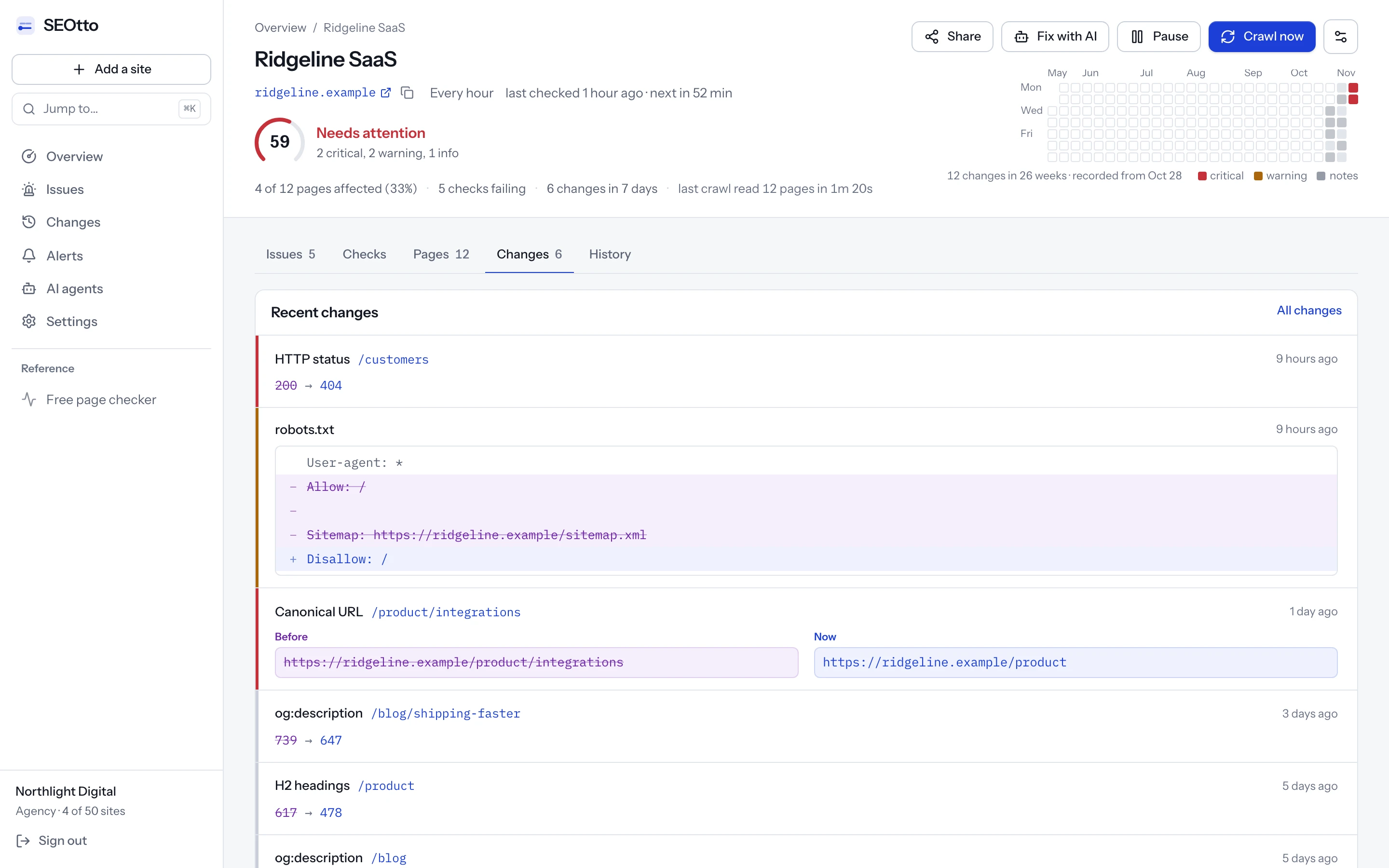
Questions
- Does Disallow in robots.txt remove a page from Google?
- No. It stops Google crawling the page. A page already in the index can stay there, and a new URL can be indexed from links to it. To remove a page, allow crawling and add a noindex. See the noindex guide.
- How long does Google take to notice a robots.txt change?
- Google caches robots.txt for up to 24 hours, so the new rules usually apply within a day. Pages that were blocked are then crawled again over the following days and weeks, the important ones first.
- Why does Search Console still show pages as blocked after I fixed robots.txt?
- The report shows what Google saw on its last crawl of each URL. It updates as the pages are crawled again. Click Validate fix on the row to have Google check the listed URLs; Google says that usually takes up to about two weeks.
- Should I fix Indexed, though blocked by robots.txt?
- Only if the listed URLs matter. If one should be in search, allow crawling so Google can read it. If one should be out of search, allow crawling and add a noindex. If they are cart links or filter variants nobody searches for, you can leave them.
- Is it a problem if my site has no robots.txt?
- No. When robots.txt answers 404, Google treats every URL as allowed. A robots.txt that answers 5xx or times out is the one to worry about, because Google stops crawling the site until it gets an answer.
- Does Google support Crawl-delay?
- No. Google's robots.txt documentation lists four supported fields: user-agent, allow, disallow and sitemap. Other fields, crawl-delay and noindex included, are ignored by Google.
- Does the robots.txt on www.example.com apply to example.com?
- No. A robots.txt applies only to the host, protocol and port it is served from.
https://example.com/robots.txt,https://www.example.com/robots.txtand each subdomain's file are separate, and each needs the rules you intend.
Sources
- How Google interprets the robots.txt specification (Google Search Central)
- Page indexing report (Search Console Help)
- URL Inspection tool (Search Console Help)
- Block Search indexing with noindex (Google Search Central)
- Robots meta tag and X-Robots-Tag specifications (Google Search Central)
- do_robots() (WordPress developer reference)
- Customize robots.txt (Shopify developer documentation)
- robots.txt file convention (Next.js documentation)
- Managed robots.txt (Cloudflare documentation)
Checked against these pages on 3 November 2026.
Written by
Suleyman
Suleyman builds SEOtto: the crawler, the checks it runs and the alerts it sends. The guides describe the same failures the checks look for, with the commands he uses to confirm them by hand.