robots.txt checker and monitoring
robots.txt is read at the start of every crawl, the way Googlebot reads it. Block the site or Googlebot and you get a critical alert with the lines that changed.
Paste a URL to test it against the site's robots.txt as Googlebot.
Monitoring is free for one site. Start free
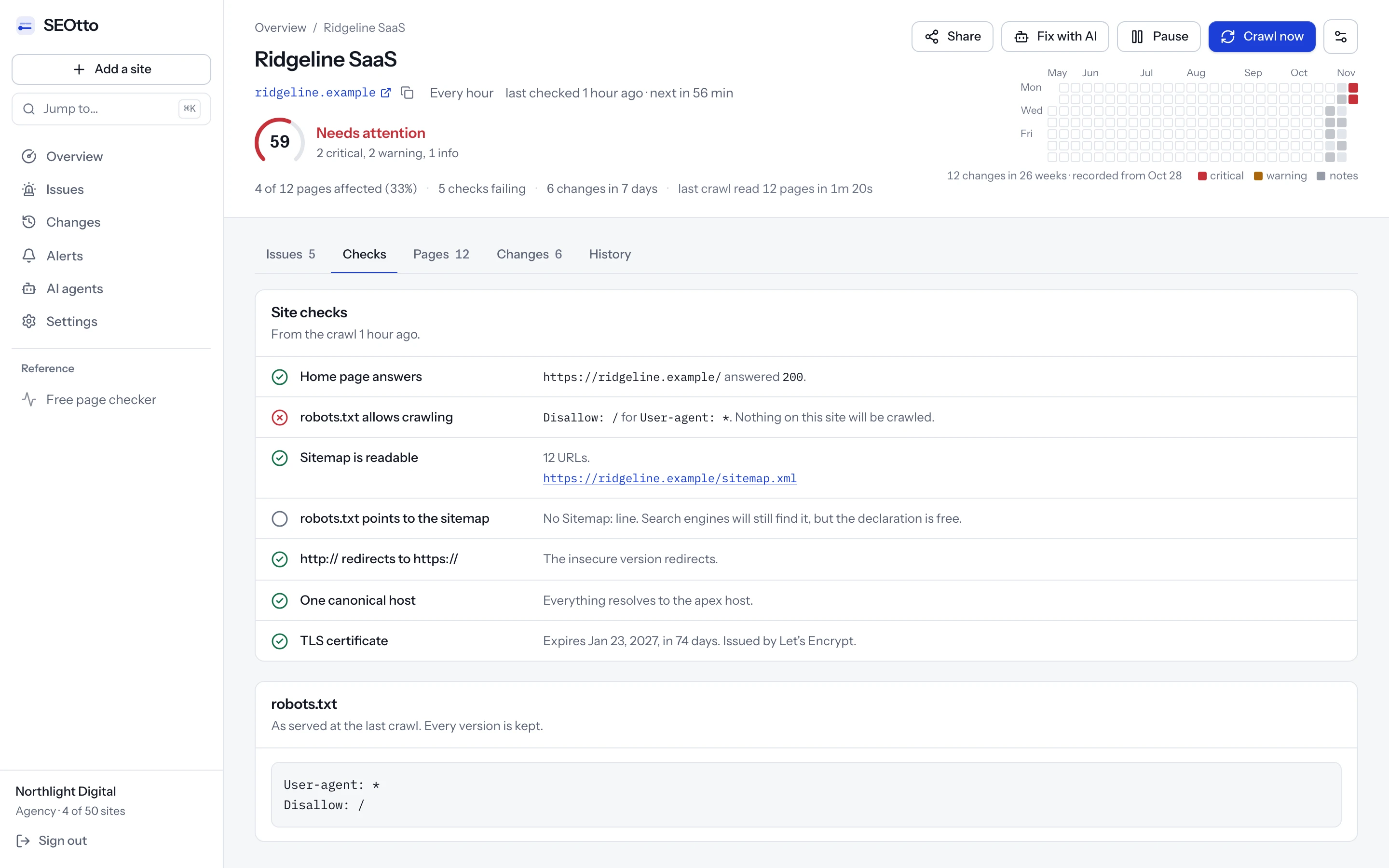
Disallow: / for User-agent: *, shown as a failing check above the file itself.robots.txt tester.
Paste a robots.txt and test a URL as Googlebot, Bingbot or any other crawler. You see which line decides. It runs in your browser on the parser the monitor uses.
Paste your file, or edit the example. Nothing is sent.
Googlebot on /account/orders
Blocked
Line 2, Disallow: /account/, is the longest rule that matches.
No group names Googlebot, so the User-agent: * group applies.
What monitoring would report for this file
- Nothing. The file blocks neither the whole site nor Googlebot, and it names a sitemap.
The example is the robots.txt of Harbor Retail, a demo store. Try /account/login, /parkas?sort=price, or GPTBot as the crawler.
robots.txt syntax: what each line does
A plain text file at the root of a site that tells crawlers which URLs they may fetch. Its lines are read in groups, one for each set of User-agent lines.
# Every crawler without a group of its own
User-agent: *
Disallow: /account/
Allow: /account/login
Disallow: /*?sort=

# One group for two crawlers
User-agent: GPTBot
User-agent: CCBot
Disallow: /

Sitemap: https://harbor-retail.example/sitemap.xml
User-agent
User-agent: GooglebotStarts a group and names the crawler it is for. A crawler follows the most specific group that matches its name and ignores every other one, so a Googlebot group replaces the * group for Googlebot entirely. Consecutive User-agent lines share one group.
- critical
robots.txt blocks Googlebot. A
User-agent: Googlebotgroup disallows everything, even though other crawlers are allowed.
Disallow
Disallow: /pathA path the crawler may not fetch, matched from the start of the URL path. Disallow: / blocks the whole site. An empty Disallow: blocks nothing.
- critical
robots.txt blocks the entire site.
Disallow: /for every user agent, so no crawler will fetch any page.
Allow
Allow: /pathOpens part of a disallowed path again. When rules conflict, the longest matching path wins, and Allow wins when the two are the same length.
Wildcards
* $* matches any characters and $ marks the end of the URL. Disallow: /*.pdf$ blocks URLs that end in .pdf, and Disallow: /*? blocks every URL with a query string.
Sitemap
Sitemap: https://…The full URL of an XML sitemap. It can go anywhere in the file, outside the groups, and a file can name several. The sitemap checker reads the one it names.
- note
robots.txt does not point to a sitemap. There is no
Sitemap:line, the one way to declare a sitemap that every crawler reads.
The file itself
/robots.txtOne file per host and protocol: https://www.example.com/robots.txt does not cover https://shop.example.com. A 404 means no restrictions. A 5xx makes Google stop crawling the site for the first 12 hours, then use the last copy it could read for up to 30 days.
- warning
robots.txt could not be fetched. robots.txt answered with a 5xx or did not answer. A 404 is fine and is not reported.
robots.txt controls crawling, not indexing. A blocked URL can still appear in Google, without a title or snippet, when other pages link to it. To keep a page out of search, let it be crawled and give it a noindex tag, which the noindex checker reads.
How to write a robots.txt that does not block Google
Most robots.txt mistakes are one line long.
Before you deploy
Keep the staging file out of production
Generate robots.txt for each environment, or serve it from the web server's config rather than the repository, so a staging
Disallow: /cannot ship with the code.Test the URLs that matter
Run the home page, a category, a product or article, and a URL with parameters through the tester above. A rule that blocks one of them is easier to see in five results than in the file.
Mind the trailing slash
Rules are prefixes.
Disallow: /blogalso blocks /blog-news and /blog.html.Disallow: /blog/blocks only what is inside the folder.Leave CSS and JavaScript crawlable
Google renders pages to understand them. A rule that blocks /assets/ or /static/ can leave it with a page it cannot lay out.
After you deploy
Open /robots.txt on the live site
Check the status code and the contents on production, at the https address with the www or non-www host people actually use. Each host has its own file.
Read the robots.txt report in Search Console
Under Settings, it shows the file Google last fetched, when, and any lines it could not parse. Google skips lines it cannot parse and uses the rest.
Watch it after every deploy
A file that was right yesterday can be replaced by a deploy, a CDN default or a plugin. SEOtto fetches it at the start of every crawl and keeps every version.
robots.txt mistakes, fixed
Before · robots.txt
User-agent: *
Disallow: /
Copied from staging with the rest of the code.
criticalrobots.txt blocks the entire site
After
User-agent: *
Disallow:

Sitemap: https://harbor-retail.example/sitemap.xml
Before · robots.txt
User-agent: *
Disallow: /account/

User-agent: Googlebot
Disallow: /
A Googlebot group added for a test and left behind.
criticalrobots.txt blocks Googlebot
After
User-agent: *
Disallow: /account/
Before · robots.txt
User-agent: *
Disallow: /admin
Also blocks /admin-guide and /administrators, because rules are prefixes.
After
User-agent: *
Disallow: /admin/
From Google Search Central's robots.txt documentation and RFC 9309, the robots.txt standard.
Where to edit robots.txt
After a change, test a URL with the checker at the top of this page. It reads the live file.
WordPress
Without a file, WordPress serves a robots.txt it generates. Yoast SEO edits it under Tools → File editor, and Rank Math under General Settings → Edit robots.txt. A robots.txt file uploaded to the site root replaces the generated one.
Shopify
Shopify generates robots.txt for every store. To change it, add a robots.txt.liquid template in the theme's code editor.
Webflow
Site settings → SEO has a robots.txt field for the published site. The .webflow.io staging address has its own setting to keep it out of search.
Wix
Wix generates robots.txt. Its SEO settings in the dashboard include a robots.txt editor for adding rules.
Next.js
Add app/robots.ts that returns the rules, or a static robots.txt in the app folder. Build the rules from an environment variable so staging and production differ.
Nginx, Apache and CDNs
A robots.txt file in the web root is served as it is. A CDN or edge rule can answer /robots.txt before the request reaches the server, so check the live URL rather than the file on disk.
Seeing “Blocked by robots.txt” in Search Console?
How robots.txt ends up blocking Google
A staging site's robots.txt usually says Disallow: / to keep it out of search. When a deploy copies that file to production, every crawler stops at the first request. The site still works in a browser, so nobody notices.
Other causes are just as ordinary: a CDN that starts serving a default robots.txt, a Disallow rule for one folder with the trailing slash in the wrong place, or a migration that stops deploying the file. WordPress before 5.3 also wrote Disallow: / when “Discourage search engines from indexing this site” was ticked. Since 5.3 that setting adds a noindex tag instead, which the noindex checker covers.
How the robots.txt checker works
The file is read before any page is fetched.
Parsed to RFC 9309
Empty Disallow, group specificity, longest match, Allow winning a tie, several User-agent lines sharing one group, and * and $ wildcards in paths. Each case is covered by tests.
Blocked for everyone, or blocked for Googlebot
Both are critical issues. Only one of them opens at a time, so a single mistake sends a single alert.
Every version kept in full
The whole file is stored, not a hash of it, so the Changes tab can show which lines were added and which were removed.
A missing robots.txt is fine
A 404 means no restrictions and is never reported. A 5xx is reported, because crawlers treat an unreachable robots.txt as an instruction to stop crawling the site until it answers.
HTML error pages are ignored
Some hosts answer /robots.txt with an HTML “page not found” and a 200 status. That counts as no robots.txt, not as rules.
The Sitemap line
A file without a Sitemap: line gets a note. Every major crawler reads that line.
Questions
- How do I check if robots.txt is blocking Google?
- Paste a URL into the checker at the top of this page, which tests it against your robots.txt as Googlebot. To check by hand, open yoursite.com/robots.txt, find the group for Googlebot (or for * if there is none) and look for a Disallow rule that matches the path. The longest matching rule wins.
- What does “Blocked by robots.txt” mean in Search Console?
- Google found the URL but did not crawl it, because a Disallow rule in robots.txt matches it. If the page should be in search, remove or narrow the rule. If it should stay out of search, use a noindex tag instead: a blocked URL can still be indexed from links to it, without its content.
- Does SEOtto follow robots.txt itself?
- While it discovers pages, yes. A URL you add by hand is fetched anyway, because you are the site owner asking for your own page to be checked.
- Can I see an old version of robots.txt?
- Yes. Every change is kept for as long as the site is monitored, with the old file beside the new one.
- What if robots.txt is generated dynamically?
- SEOtto reads what the server returns, which is what Googlebot reads. If the file differs from one request to the next, the difference shows up as a change.
- How do I test robots.txt?
- Paste the file into the robots.txt tester on this page and try a URL as Googlebot. It shows whether the URL is blocked and which line decides. To test the file a site serves today, paste a URL into the checker at the top of the page.
- Can I test a URL against robots.txt in Search Console?
- Search Console's robots.txt report, under Settings, shows the file Google last fetched and the lines it could not parse, but it does not test a URL against the rules. The tester on this page does.
- Does Google support Crawl-delay?
- No. Google reads only User-agent, Allow, Disallow and Sitemap, and ignores Crawl-delay. Some other crawlers read it.
- How do I block AI crawlers in robots.txt?
- Add a group for each one with
Disallow: /:User-agent: GPTBotfor OpenAI,User-agent: ClaudeBotfor Anthropic,User-agent: CCBotfor Common Crawl, andUser-agent: Google-Extendedfor Google's AI models. Google-Extended does not affect Google Search. A crawler that ignores robots.txt is not stopped by it.
More technical SEO checks
Free SEO website checker
Paste a URL to check noindex, robots.txt, canonical, title, meta description, H1, Open Graph tags and structured data, with how to fix each issue. No signup.
Noindex checker for meta robots and X-Robots-Tag
Check every page for noindex in the meta robots tag and the X-Robots-Tag header. SEOtto sends a critical alert when a page stops being indexable.
XML sitemap checker and monitoring
Check sitemap.xml for a 404, a parse error, an empty file or a sudden drop in URL count. Sitemap indexes and gzipped sitemaps supported.
Meta tag checker: title, meta description, H1 and canonical
Check any page's meta title and meta description for free, with the length of each and a preview of the search result. Then track every change, crawl by crawl.