XML sitemap checker and monitoring
Your XML sitemap is read on every crawl, sitemap indexes and .gz files included. You hear about it when it errors, stops parsing, empties or loses 20% or more of its URLs.
Paste your site's address to find its sitemap and count its URLs.
Monitoring is free for one site. Start free
XML sitemap validator.
Check a sitemap or sitemap index against the sitemaps.org rules before it goes live. Nothing is uploaded.
Paste a sitemap or a sitemap index, or edit the example. Nothing is sent.
Reading the sitemap…
The example is a sitemap for Harbor Retail, a demo store, with two mistakes in it: a relative URL and a date in the wrong format.
What is an XML sitemap?
A file that lists a site's URLs for search engines, with the date each one last changed. It matters most for new pages and pages with few links to them.
<?xml version="1.0" encoding="UTF-8"?>
<urlset xmlns="http://www.sitemaps.org/schemas/sitemap/0.9">
  <url>
    <loc>https://harbor-retail.example/parka</loc>
    <lastmod>2026-10-28</lastmod>
  </url>
</urlset>
urlset
<urlset>The root element of a sitemap, with the protocol's namespace. A file with any other root is not a sitemap, and an HTML error page served at /sitemap.xml is the usual one.
- critical
Sitemap is not valid. It answered, but is not a urlset, a sitemap index or a plain list of URLs. Truncated XML and HTML error pages land here.
url and loc
<url><loc>One <url> for each page, with its full address in <loc>, https:// and host included. List the canonical URL of each page you want in search, not redirects or noindexed pages. Write & in a URL as &.
- critical
Sitemap lists no URLs. A valid sitemap with zero URLs, which is what a generator run against an empty database writes.
- warning
Sitemap lost a significant share of its URLs. The URL count fell by 20% or more against the highest count of the last week.
lastmod
<lastmod>When the page's content last changed, in W3C format such as 2026-10-28. Google uses it when it is consistently accurate, so set it from real edits, not from the time the file was built. Google ignores <changefreq> and <priority>.
Sitemap index
<sitemapindex>A list of sitemaps. One sitemap can hold 50,000 URLs and 50 MB uncompressed, so a larger site splits its URLs into several files and lists them in an index. SEOtto follows the index to each sitemap.
Gzipped sitemaps
sitemap.xml.gzSitemaps can be gzipped to save bandwidth. The 50 MB limit counts the uncompressed file. SEOtto detects gzip from the bytes, because some servers send it without a Content-Encoding header.
Where crawlers find it
Sitemap: in robots.txtA Sitemap: line in robots.txt, a submission in Search Console, or a usual address such as /sitemap.xml. SEOtto looks at your site settings, then robots.txt, then /sitemap.xml, /sitemap_index.xml and /wp-sitemap.xml.
- warning
No sitemap found. Nothing in robots.txt, and nothing at /sitemap.xml, /sitemap_index.xml or /wp-sitemap.xml.
- critical
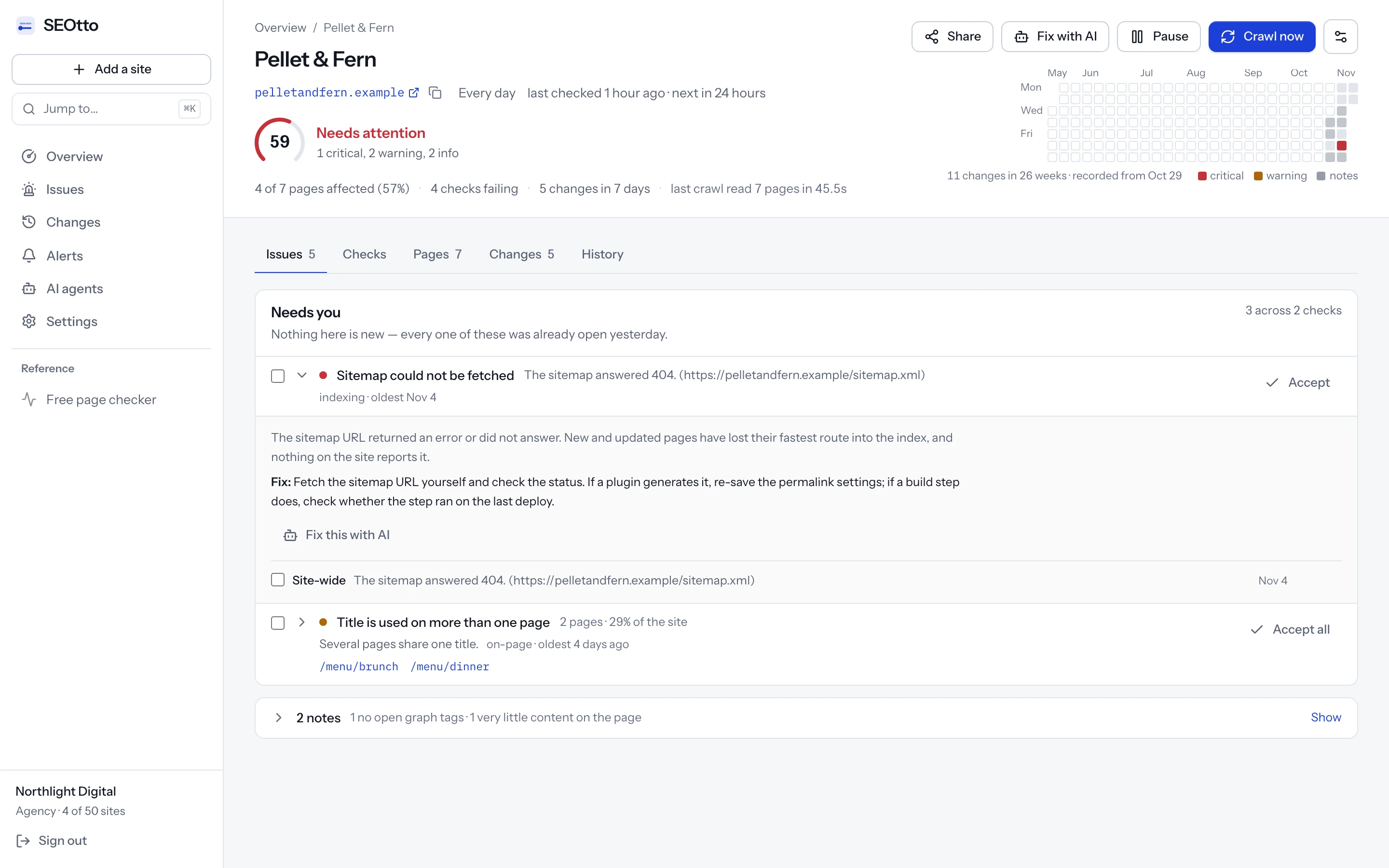
Sitemap could not be fetched. The sitemap URL returned an error status or did not answer.
Every URL in a sitemap should be one you want indexed. A sitemap listing noindexed or redirecting URLs gives Google two opposite instructions, and Search Console reports them. The noindex checker reads the robots directives of every tracked page.
How to fix common sitemap errors
What Search Console's sitemap errors usually mean, and the ones it never shows.
Sitemap errors in Search Console
Couldn't fetch
Google could not download the file: an error status, a timeout, a robots.txt block or a wrong URL. Open the sitemap URL in a private window and check the status code. For a sitemap submitted minutes ago it can also mean Google has not fetched it yet.
Sitemap is HTML
The URL answered with a web page, usually a 404 page or a login screen sent with a 200 status. Point Search Console and robots.txt at the real XML file.
Invalid XML or a parsing error
The file is cut off or has a character that breaks XML, most often an
&that is not written as&. A generator that times out often leaves the closing tag off. The validator above shows the line.URL not allowed
A URL is on a different host or protocol from the sitemap: http URLs in an https sitemap, or www URLs in a sitemap on the bare domain.
Errors Search Console does not show
An empty sitemap
A valid file with no URLs is not an error to Search Console. It is what a build writes when it runs before the content is in the database.
A sitemap that shrinks
A plugin setting or a failed import can drop half the URLs, and the file stays valid. SEOtto compares each crawl's count with the highest count of the last seven days and warns at a 20% drop.
An old sitemap left behind
After a move to a new CMS, an old /sitemap.xml can keep answering with URLs that redirect. Remove it or redirect it to the new one, and check that robots.txt names the right file.
Sitemap mistakes, fixed
Before · sitemap.xml
<loc>https://harbor-retail.example/search?q=parka&sort=price</loc>
An unescaped & stops the XML parser.
criticalSitemap is not valid
After
<loc>https://harbor-retail.example/search?q=parka&sort=price</loc>
Before · sitemap.xml
<loc>/rain-jackets</loc>
The protocol asks for full URLs.
After
<loc>https://harbor-retail.example/rain-jackets</loc>
From the sitemaps.org protocol and Google Search Central's documentation on building a sitemap.
Where to find your sitemap
The usual addresses. Paste one into the checker at the top of this page.
WordPress
Since version 5.5, WordPress serves /wp-sitemap.xml. Yoast SEO and Rank Math replace it with /sitemap_index.xml, an index with one sitemap for each content type.
Shopify
/sitemap.xml, generated for every store: an index linking to sitemaps for products, collections, pages and blog posts. It cannot be edited directly.
Webflow
/sitemap.xml, when the auto-generated sitemap is on in Site settings → SEO. Single pages can be left out of it in their page settings.
Wix
/sitemap.xml, generated and updated when pages are published.
Squarespace
/sitemap.xml, generated and kept up to date as pages are added.
Next.js
Add app/sitemap.ts that returns the URLs, and it is served at /sitemap.xml. For more than 50,000 URLs, generateSitemaps splits it into several files.
Search Console says the sitemap “Couldn't fetch”?
Why XML sitemaps break without an error
Sitemaps are generated by a CMS plugin, a build step or a scheduled job, and all three can fail without anyone seeing it. A build that runs before the content is in the database writes a valid sitemap with zero URLs. A generator that times out writes a truncated XML file. A permalink change leaves the old sitemap URL returning 404 while the new one is never declared.
The server logs nothing, because from its side nothing failed, and visitors never open a sitemap. The only symptom is that new pages take months to be indexed instead of days, and Search Console shows “Couldn't fetch” or a falling count of discovered pages.
How the sitemap checker works
The sitemap is read first. It is also where the crawl finds its pages.
Finds the sitemap the way a crawler does
The sitemap URLs in your site settings, then any Sitemap: line in robots.txt, then /sitemap.xml, /sitemap_index.xml and /wp-sitemap.xml. A sitemap you set yourself always wins, so an old file left by a previous CMS is not mistaken for the real one.
Sitemap indexes and .gz files
A sitemap index is followed one level down to its child sitemaps. Gzip is detected from the bytes rather than the header, because some servers do not send one.
A separate issue for each failure
Unreachable, invalid, empty, shrinking and missing are five issues, because each has its own cause and fix.
URL count compared over a week
Each crawl compares the URL count with the highest count from the last seven days. A drop of 20% or more opens a warning that stays open until the count recovers.
Plain-text sitemaps
A text file with one URL per line is a valid sitemap, and some plugins write one. It is read as text only when the body is not markup, so an HTML error page is not mistaken for a list of URLs.
A fallback when the sitemap breaks
Page discovery starts from the sitemap. If it breaks, the crawl follows internal links instead, and the crawl report says that it did.
Questions
- How do I check if my sitemap is working?
- Paste your site's address into the checker at the top of this page. It looks for the sitemap where SEOtto's crawler does, in robots.txt and then at the usual paths, and tells you whether it answers, whether it parses and how many URLs it lists. A sitemap index is counted there but not opened; monitoring follows it to every child sitemap.
- What does “Couldn't fetch” mean for a sitemap in Search Console?
- Usually that Google could not download the sitemap: the URL returned an error, timed out or was blocked. Open the sitemap URL in a browser and check the status code. If a plugin generates it, re-save the plugin's settings; if a build step does, check that the step ran on the last deploy.
- Do you check every URL in the sitemap?
- Up to your plan's page limit, yes: 25 pages on Free, 500 on Pro and 2,000 on Agency. Each URL becomes a tracked page with its own status code, title and indexability. If the sitemap lists more, the crawl report shows how many URLs were found and how many were checked.
- My sitemap has 50,000 URLs. What happens?
- The whole sitemap is counted, so a drop is still detected. Pages are checked up to your limit, starting with URLs you added by hand. Include and exclude paths in site settings decide which part of the site the limit is spent on.
- Are image and news sitemaps supported?
- They are read as ordinary sitemaps: the URLs are tracked and the count is watched. The image and news extensions are not validated.
- How do I check if my sitemap is valid?
- Paste it into the XML sitemap validator on this page. It checks that the file parses and that its root is a <urlset> or <sitemapindex>, counts the URLs, then tests them against the protocol: full URLs, one host, no duplicates, and no more than 50,000 URLs or 50 MB.
- Where is my sitemap?
- Try /sitemap.xml, /sitemap_index.xml and /wp-sitemap.xml on your domain, and look for a Sitemap: line in /robots.txt. The checker at the top of this page looks in all of those for you.
- Which pages should be in the sitemap?
- Every page you want in search, and only those: canonical URLs that answer 200 and are not noindexed. Leave out redirects, error pages, and URLs with filter or sort parameters.
- Does Google use priority and changefreq?
- No. Google ignores both. It uses
<lastmod>when the dates are consistently accurate. - What is sitemap monitoring?
- Checking the sitemap on a schedule rather than once. SEOtto fetches it at the start of every crawl, compares the URL count with the last seven days, and alerts you when it fails to load, stops parsing, empties, or loses 20% or more of its URLs.
More technical SEO checks
Free SEO website checker
Paste a URL to check noindex, robots.txt, canonical, title, meta description, H1, Open Graph tags and structured data, with how to fix each issue. No signup.
Noindex checker for meta robots and X-Robots-Tag
Check every page for noindex in the meta robots tag and the X-Robots-Tag header. SEOtto sends a critical alert when a page stops being indexable.
robots.txt checker and monitoring
Check robots.txt for rules that block Google. SEOtto reads robots.txt on every crawl, keeps every version and alerts you when the rules change.
Meta tag checker: title, meta description, H1 and canonical
Check any page's meta title and meta description for free, with the length of each and a preview of the search result. Then track every change, crawl by crawl.