Traffic dropped after a redesign: what to check, in order
A redesign that loses search traffic usually broke something you can test: a noindex, a robots.txt rule, missing redirects, rewritten titles or a dead sitemap.
GET /shop/jackets
Flattened, every old URL goes straight to the page
The short answer
When a redesign loses search traffic, look first at what a crawler reads, because that can change while the pages still look right to people. Look for a noindex or robots.txt rule carried over from staging, old URLs that answer 404 or redirect badly, templates that rewrote titles and canonicals, a sitemap that lists the wrong URLs, and pages that lost their text.
Check them in that order. The first two can take the whole site out of Google and need a few minutes to rule out. Redirects are where most of the remaining damage is, so test every old URL, including the long tail that nobody put in the spreadsheet.
Then compare the date the drop started with the date of the deploy, one group of pages at a time, before deciding that a Google update did it.
Search Console wording this guide covers
- Page with redirect
- Redirect error
- Not found (404)
- Soft 404
Moving to a new domain? You need the same checks, plus the Change of Address tool in Search Console.
What should you check first?
Work down this table on the live site. Staging was checked before launch. What matters now is what production serves to a crawler, on the URLs that people and Google already know.
| Check | Where to look | What bad looks like | What it costs if you miss it |
|---|---|---|---|
| 1. robots.txt | /robots.txt on the live host | Disallow: / under User-agent: * | Google stops crawling every page on the host. |
| 2. noindex | The response header and the HTML of a few pages per template | noindex or none in X-Robots-Tag or a robots meta tag | Each page leaves the index the next time Google crawls it. |
| 3. Redirects | Every old URL you can list, requested one by one | 404s, 302s, chains, loops, everything sent to the home page | Old URLs drop out, and the links pointing at them lead nowhere. |
| 4. Titles, H1s, descriptions, canonicals | View source on one page per template | The brand first in every title, no <h1>, one description everywhere, a canonical to the home page | Pages rank lower or for fewer queries, and fewer people click. |
| 5. Sitemap | /sitemap.xml and the Sitemaps report | Old URLs listed, far fewer URLs than pages, a 404 | Google finds the new URLs more slowly. |
| 6. Internal links | Navigation, footer and body links | Links to old URLs that now redirect | Every click and every crawl goes through a redirect first. |
| 7. Content | The text of a page, old against new | Long pages cut to a hero and three cards; text that only appears after a script runs | Pages stop answering the searches they used to rank for. |
Disallow: / and a page into a 404; the day before, a canonical changed and three Verity Legal pages turned noindex. Each row is one of the checks in the table above.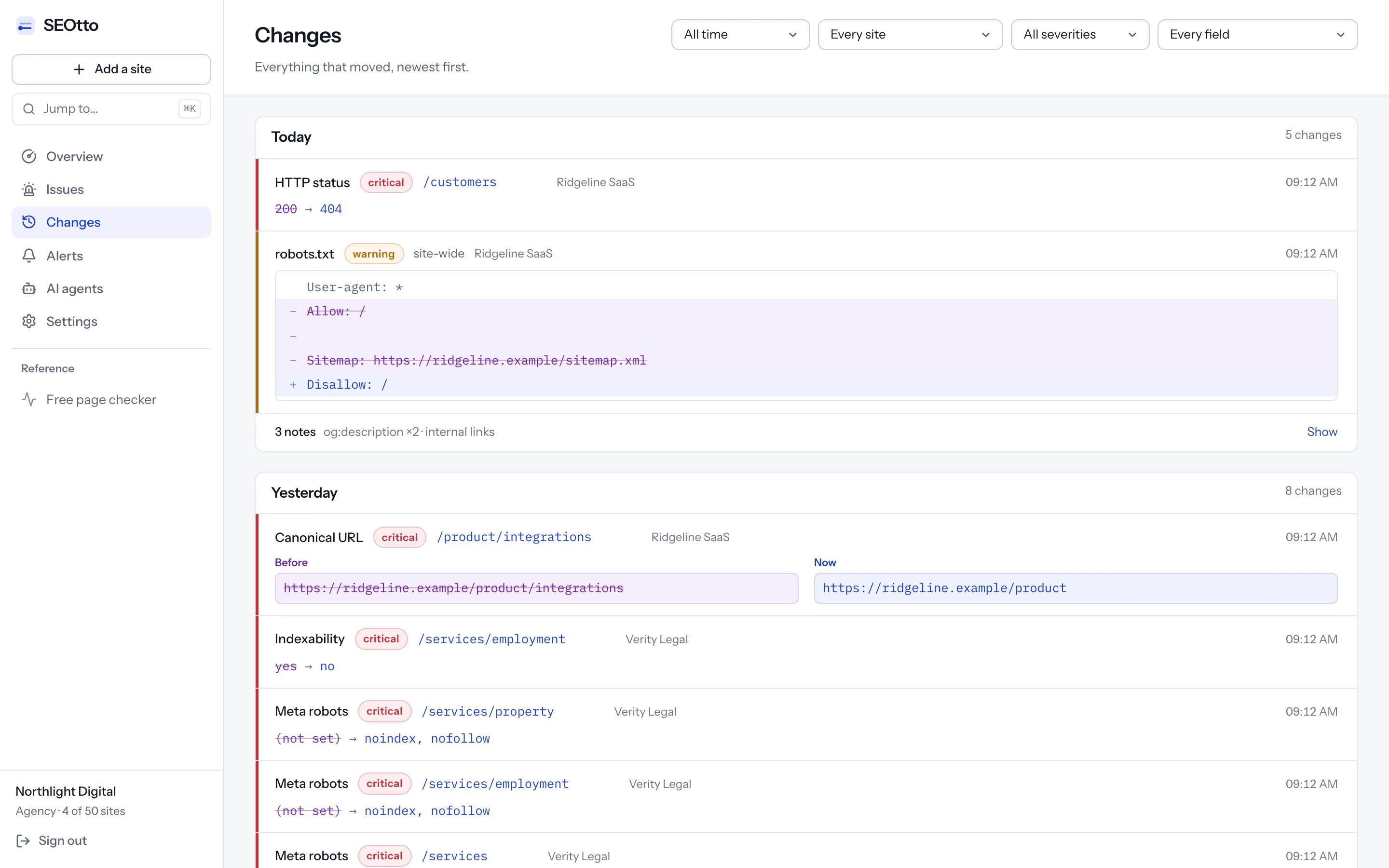
Is anything telling Google to stay away?
A staging site is usually kept out of search on purpose, with a robots.txt that blocks everything or a noindex on every page. Both are correct on staging. A launch carries them to production when the file is copied with the rest of the build, or when the setting that switches the noindex off is not set on the new servers.
robots.txt
Fetch the live file and read it. This is what a staging file looks like after it has been deployed:
curl -s https://example.com/robots.txt
Disallow: / under User-agent: * closes every path to every crawler without a group of its own. The robots.txt guide covers how Google picks the group and the rule that applies.noindex in the header and in the HTML
A noindex can arrive in two places, and you need to check both. The X-Robots-Tag header is added by the server or a CDN and never shows up in view-source. Use a GET request, because some servers answer a HEAD request differently.
curl -s -o /dev/null -D - https://example.com/collections/coats | grep -i x-robots-tag
noindex or none in it removes the page.curl -s https://example.com/collections/coats | grep -Eio "<meta[^>]*name=[\"']?(robots|googlebot)[\"']?[^>]*>"
name="googlebot" as well as name="robots", and finds the tag whichever order its attributes are in.Run both on one page from every template, not only the home page. A setting tied to a template or a path can leave the home page clean and a whole product section noindexed. If either check finds something, the noindex guide shows how to trace it to the CMS, the template, the server or the CDN.
Does every old URL still lead somewhere?
The check most often half done: the top pages get rules, and the long tail is left to 404.
A redirect map that covers the fifty pages in the launch spreadsheet and leaves the other few hundred answering 404 loses the traffic that was cheapest to keep. The new URLs were tested before launch. The old ones usually were not, and they are the ones Google and other sites link to.
Build the list of old URLs
Use more than one source, because each one misses something:
- The old sitemap. Save a copy before launch day, because the generator will overwrite it.
- Search Console, Performance report, Pages tab: every URL that had clicks or impressions in the last few months. Export it.
- Search Console, Page indexing report: the indexed pages, exported.
- Your analytics' landing pages for organic search.
- A crawl of the old site, if you took one before launch.
Request each one
Put the URLs in a file, one per line, and print the status code and the redirect target of each. -w makes curl print only what you ask for, and without -L it shows the first response, which is the one the rule produces.
while read -r url; do printf '%s %s\n' "$url" "$(curl -s -o /dev/null -w '%{http_code} %{redirect_url}' "$url")" done < old-urls.txt
A 301 only helps if its target is the final page. Follow one URL all the way with -L, and curl counts the hops for you:
curl -s -o /dev/null -L -w '%{num_redirects} %{http_code} %{url_effective}\n' https://example.com/shop/jackets
Which redirect to use
Google sorts redirects into permanent and temporary, and only the permanent ones tell it the new URL should replace the old one in results.
| Redirect | Google treats it as | What it tells Google |
|---|---|---|
301, 308 | Permanent | The target should be the canonical URL. Use these for a redesign. |
| Meta refresh with a 0 second delay | Permanent | The same, when the server cannot send a 301. |
JavaScript location change | Permanent | The same, but Google only sees it if the page renders. Use it when nothing else is possible. |
302, 303, 307 | Temporary | Keep the old URL. The target is not used as a canonical signal. |
| Meta refresh with a delay | Temporary | The same as a 302. |
Test your redirect map before it ships.
One rule per line: the old URL, then the new one. Spaces, a tab, a comma or -> between them. Nothing is sent.
One per line: the old sitemap, or the pages Search Console shows with clicks.
The example has a three-hop chain, a loop between two URLs, two rules for one URL, four pages sent to the home page, and two old URLs with no rule. Replace it with yours.
12 rules, 7 old URLs
6 problems
- Break the URL
- 2
- Cost traffic
- 4
- Worth a look
- 0
5 of 7 old URLs have a rule or are pages on the new site.
Redirect loops1
/blog/2019/sizing-guide → /guides/sizing → /blog/2019/sizing-guide
/blog/2019/sizing-guide → /guides/sizing → /blog/2019/sizing-guide goes round in a circle.
Decide which URL is the real page, make it answer 200, and point the others straight at it. Search Console reports every URL in a loop as Redirect error.
Lines 7, 8
Two rules for one URL1
/shop/boots has 2 rules with different targets: /collections/boots, /footwear/boots.
Keep one rule. Most servers apply the first match, so the others never run, and which one wins can change when the config is reordered.
Lines 5, 6
Redirect chains1
/shop/jackets → /outerwear → /collections/outerwear → /collections/coats
/shop/jackets takes 3 hops to reach /collections/coats.
Point /shop/jackets straight at /collections/coats. Each hop is another request before the page loads, and Google advises avoiding chains.
Lines 2, 3, 4
Many URLs sent to one page1
4 old URLs end on the home page: /about-us, /team, /careers, /press.
Send each one to the page that replaced it. Google says many old URLs redirected to one irrelevant URL, such as the home page, may be treated as a soft 404. Where nothing replaced a page, letting it return 404 is the honest answer.
Lines 9, 10, 11, 12
Old URLs with no rule2
/shop/scarves has no rule. It will answer 404 unless the old URL still exists on the new site.
Add a rule to the page that replaced it, or confirm the URL still answers 200.
/returns has no rule. It will answer 404 unless the old URL still exists on the new site.
Add a rule to the page that replaced it, or confirm the URL still answers 200.
The map with every chain collapsed
Each old URL points straight at the page it ends on. Loops are left as comments, because only you know which page is the real one.
/shop/jackets            /collections/coats
/outerwear               /collections/coats
/collections/outerwear   /collections/coats
/shop/boots              /collections/boots
# /blog/2019/sizing-guide  (in a loop: fix by hand)
# /guides/sizing  (in a loop: fix by hand)
/about-us                /
/team                    /
/careers                 /
/press                   /
/shop/gloves             /collections/accessories/gloves
Did the new templates rewrite your titles, headings and canonicals?
Each change looks reasonable in review. Together they can cost a page its ranking.
A redesign rewrites the head of every page, and it is common for the new template to fill these fields differently from the old one. The title gets the brand moved to the front, which pushes the words the page ranked for to the end, where Google cuts them off. The heading becomes a styled div, because the design system's heading component renders one. The meta description falls back to one sentence for the whole site on every page nobody re-entered by hand.
/outerwear/rain-jackets, old template
/collections/rain-jackets, new template
The canonical is the one to check first, because a wrong canonical is an instruction. Google's site move guide says each new URL should have a self-referencing rel="canonical". A template that writes the home page, the old URL or a staging host into every canonical asks Google to index something else.
curl -s https://example.com/collections/coats | grep -Eio "<link[^>]*rel=[\"']?canonical[\"']?[^>]*>"
curl -s https://example.com/collections/coats | grep -Eio "<title>[^<]*</title>"
curl -s https://example.com/collections/coats | grep -c "<h1"
Run these on one URL per template and compare with what the old page had. If you have no record of the old values, the Wayback Machine may hold a copy of your busiest pages. If the site was monitored before the launch, SEOtto's Changes feed lists every title, description, H1 and canonical the deploy changed, page by page.
When many pages end up with the same title, the duplicate title tags guide shows how to find the template defaults in a crawl export.
Does the sitemap list the new URLs, and do your links point at them?
Both tell Google which URLs you consider current. After a launch they often still name the old ones.
A new stack means a new sitemap generator. Google's site move guide asks for the new sitemap to be submitted in Search Console, with the new URLs in it. Count what the live sitemap lists, then count how many old URLs it still names:
curl -s https://example.com/sitemap.xml | grep -o '<loc>' | wc -l
curl -s https://example.com/sitemap.xml | grep -o '<loc>[^<]*' | grep -c '/shop/'
/shop/. Seventeen of them are still in the sitemap, and each one now answers with a redirect.If the file is a sitemap index, these counts only cover the index. Read the child sitemaps it lists, or see the sitemap guide for that and for the errors Search Console reports.
Internal links
Google's site move guide also says to change internal links from the old URLs to the new ones. A navigation menu or a footer that still links to old URLs sends every visitor and every crawl through a redirect, on every page. Search the HTML of a page for the old pattern:
curl -s https://example.com/ | grep -o 'href="/shop/[^"]*"' | sort -u
Did the pages lose content?
The slowest of the checks to show up, and easy to miss because the new page looks better.
Redesigns tend to shorten pages. A category page that had a long buying guide under the products becomes a hero, three cards and a button. It looks better, and it no longer answers the questions people searched for when they found it.
Compare the amount of text on the old and new version of the same page, fetched the same way. The count below includes scripts and menus, so read it as a ratio between two versions rather than a word count:
curl -s https://example.com/collections/coats | sed -e 's/<[^>]*>/ /g' | wc -w
When a page lost most of its text, check whether a component stopped rendering before assuming somebody cut it. Look for the text in the HTML the server sends. If it only appears after a script runs, open URL Inspection in Search Console, run Test live URL and look at the tested page's HTML to see what Google rendered.
Was it the redesign, a Google update or the season?
Before changing anything, check that the drop starts where the redesign did.
Search Console's Performance report shows clicks by day. Two comparisons settle most cases. First, put the date the drop started next to the date of the deploy. Second, split the pages into groups, one per template or URL folder, and compare the groups the redesign changed with the ones it left alone.
Launch day
Compare groups, not single URLs. When a URL changes, its clicks move from the old URL to the new one in the report, so the old URL always looks like it collapsed and the new one like it appeared from nothing.
| What you see | What it usually points to |
|---|---|
| The drop starts within days of the deploy, in the groups that changed | The redesign. Work through the checks above. |
| Old URLs piling up under Not found (404) in the Page indexing report | Missing redirects. |
| Old URLs under Soft 404 | Redirects to the home page or to pages that don't match. |
| Pages moving into Excluded by ‘noindex’ tag, or into URL marked ‘noindex’ as Google's help page calls it | A noindex shipped with the new templates. |
| Impressions steady, clicks down | Titles and descriptions changed, so fewer people click. |
| Every group falls on the same date, with no deploy that week | Something outside the redesign. Check the Google Search Status Dashboard for a ranking update around that date. |
| The same dip in the same weeks last year | The season. Compare the date range with the year before. |
Old URLs under Page with redirect are not a problem. Google's help page describes them as non-canonical URLs that redirect to another page, which is what an old URL should be after a migration.
How long does recovery take?
Google does not give a recovery date. It does say how long the parts of a move take.
| Question | What Google says | Source |
|---|---|---|
| How long until the new URLs show in search? | For medium-sized sites, a few weeks or more. | Site moves |
| Will rankings move during the change? | Expect temporary fluctuation. | Site moves |
| How long should the redirects stay? | As long as possible, generally at least 1 year. For users, consider keeping them indefinitely. | Site moves |
| How many hops will Googlebot follow? | Up to 10. Redirect to the final page directly, ideally in no more than 3 hops and fewer than 5. | Site moves |
| Does a 301 lose PageRank? | No. Permanent redirects don't cause a loss in PageRank. | Site moves |
| How fast does a removed noindex take effect? | When Google next crawls the page. For a page it rarely visits, that can take months. | Block indexing |
| How long does Validate fix take? | Typically up to about two weeks, sometimes much longer. | Page indexing report |
What speeds it up
Fix the cause on the server
A noindex or a robots.txt rule first, then the redirects, then the templates. Each fix applies to every page at once.
Resubmit the sitemap
In Search Console, Sitemaps, submit the new sitemap URL again so Google reads the corrected list of URLs.
Request indexing for the pages that matter most
In URL Inspection, inspect each one and choose Request indexing. There is a daily limit per property, so start with the pages that had the most traffic.
Validate the fix in the Page indexing report
Open the reason you fixed, such as Not found (404), and click Validate fix. Search Console rechecks the listed URLs and reports when they pass.
A checklist for the next launch.
| Item | Before launch | After launch | Usually done by |
|---|---|---|---|
| robots.txt | The production file is in the repository, separate from staging's. | Fetch the live file. Test one URL from each template against it. | Developer |
| noindex | Check which setting or environment variable switches it off, and that production sets it. | Check the header and the meta tag on one page per template. | Developer |
| Redirect map | Map every old URL from the sitemap, Search Console and analytics. Run the map through the checker above. | Request every old URL. Fix 404s, 302s and chains the same day. | Developer and SEO |
| Titles, descriptions, H1s, canonicals | Compare old and new on staging, one page per template. | Spot-check live pages. Canonicals must name the page itself. | SEO and content |
| Sitemap | The generator lists the new URLs only. | Count the URLs. Submit the sitemap in Search Console. | Developer |
| Internal links | Menus, footers and links in page text use the new URLs. | Search the live HTML for the old URL pattern. | Developer and content |
| Content | Compare the text of the main templates, old and new. | Check the rendered HTML in URL Inspection. | Content |
| Search Console | Export the Pages and Queries tables as a baseline. Keep the old sitemap. | Watch Page indexing for Not found (404), Soft 404 and noindex, and Performance by page group, daily. | SEO |
Questions
- How long does it take to get traffic back after a redesign?
- Google doesn't give a number for recovery. Its site move guide says that for medium-sized sites it can take a few weeks or more for the new URLs to show, and that rankings fluctuate during the move. Pages come back as Google recrawls them after the fix, so fixing the cause the same week matters more than anything you do afterwards.
- Is it normal to see old URLs under “Page with redirect”?
- Yes. Google describes these as non-canonical URLs that redirect to another page, which is what an old URL should be after a migration. The ones to worry about are old URLs under Not found (404), Soft 404 or Redirect error.
- Can I redirect all the old pages to the home page?
- Google advises against it. Its site move guide says many old URLs redirected to one irrelevant URL, such as the home page, may be treated as a soft 404. Redirect each old URL to the page that replaced it, and let pages with no replacement return 404.
- Do 302 redirects hurt SEO after a migration?
- Google treats a 302 as temporary and does not use it as a signal that the new URL should replace the old one. For a page that has moved for good, use a 301 or a 308.
- How long should I keep the redirects?
- Google says as long as possible, generally at least a year, and suggests keeping them indefinitely for the sake of users who have the old URLs bookmarked or linked.
- What causes “Redirect error” in Search Console?
- Google lists a redirect chain that is too long, a redirect loop, a redirect URL that exceeds the maximum URL length, and a bad or empty URL in the chain. The redirect map checker above finds the first two in a map before it is deployed.
Sources
- Google Search Central: Site moves with URL changes
- Google Search Central: Redirects and Google Search
- Search Console Help: Page indexing report
- Search Console Help: URL Inspection tool
- Google Search Central: Block search indexing with noindex
Checked against these pages on 3 November 2026.
Written by
Suleyman
Suleyman builds SEOtto: the crawler, the checks it runs and the alerts it sends. The guides describe the same failures the checks look for, with the commands he uses to confirm them by hand.