Noindex checker for meta robots and X-Robots-Tag
A critical alert when a page turns noindex, whether the meta robots tag or the X-Robots-Tag header did it. That is usually before Google recrawls the page and drops it.
Paste a URL to check its meta robots tag and X-Robots-Tag header.
Monitoring is free for one site. Start free
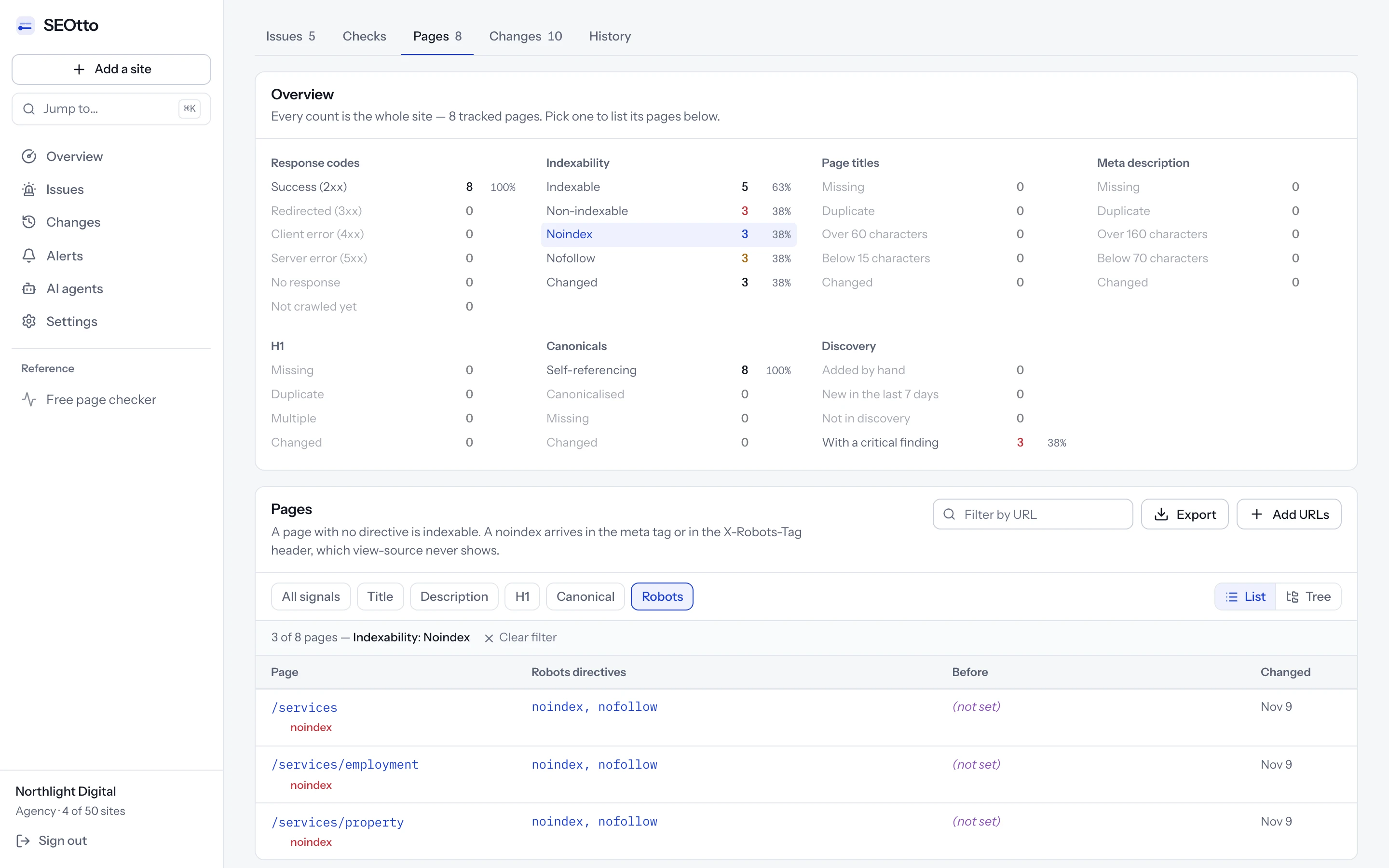
noindex, nofollow in meta robots, where before there was no directive.What is a noindex tag?
It keeps a page out of search results. It can sit in the HTML or arrive as an HTTP header, so a checker has to read both.
<!-- In the <head> of the page -->
<meta name="robots" content="noindex">
<meta name="googlebot" content="noindex">
<meta name="robots" content="none">

# As an HTTP response header
X-Robots-Tag: noindex
Meta robots tag
<meta name="robots">In the page's head, for every search engine. Values are comma-separated and case-insensitive, so NOINDEX and noindex, nofollow both keep the page out. When two robots tags disagree, the more restrictive one applies.
- critical
Page is set to noindex. A noindex directive in the meta robots tag, a googlebot meta tag or the X-Robots-Tag header.
Googlebot meta tag
<meta name="googlebot">The same directive for Google's crawler only. Other search engines ignore it, so a page with it can be in Bing and missing from Google. SEOtto reads it together with the robots tag.
X-Robots-Tag header
X-Robots-Tag: noindexAn HTTP response header, added by the server, a CDN or the hosting platform. It works for PDFs and images, which have no head. It never appears in the page source, which is why a review of the templates does not find it.
The none value
content="none"Shorthand for noindex, nofollow. A check that searches the page for the word noindex misses it, so SEOtto reads none as a noindex.
Two things are often mistaken for a noindex. A Disallow rule in robots.txt stops Google crawling a URL, so Google never reads a noindex on it, and the URL can stay in search from links to it. A canonical tag that names another URL asks Google to index that URL instead, and Google treats it as a hint. The robots.txt checker and the meta tag checker cover those two.
How to find and remove a noindex tag
Find where the directive comes from, remove it there, and ask Google to crawl the page again.
Find where the noindex comes from
Read the page as it is served
Open the page source (Ctrl+U in most browsers) and search for “robots”. Then open the developer tools, reload with the Network tab open, and look for X-Robots-Tag in the page's response headers. The checker at the top of this page reads both.
Compare a noindexed page with one that is not
When one section is noindexed and the rest of the site is not, the cause is usually that section's template, or a CMS setting for that content type, rather than the server.
Look at the CDN and the host
When the header is there and no template sets it, a CDN rule, an edge function or the hosting platform adds it. Vercel, for example, sends a noindex header on preview deployments by default.
Remove it and get the page back
Fix it where it is set
Change the setting, template or header rule that adds the noindex. A page edited by hand gets it back from the template on the next deploy.
Purge the caches
A page cache or CDN can keep serving the old HTML and headers after the fix. Check the page again after purging them.
Ask Google to recrawl
Google drops or restores a page only after it crawls it again, which for a page it rarely visits can take months. In Search Console, inspect the URL and choose Request indexing. For many pages, resubmit the sitemap.
Keep the noindex where you want it
Thank-you pages, internal search results and staging sites are often noindexed on purpose. Accept those issues in SEOtto with a note, and only a change to them sends an alert.
From Google Search Central's documentation on blocking indexing with noindex and the robots meta tag.
Where noindex is set in common platforms
Where to look first when nobody remembers adding it.
WordPress
Settings → Reading → “Discourage search engines from indexing this site” noindexes every page. Yoast SEO sets it per post in the Advanced tab of its box, and per content type in its settings. Rank Math has Robots Meta settings per post.
Shopify
The admin has no noindex switch for a single page. A noindex on a Shopify store comes from the theme's code or from an app, so search the theme files for “noindex”.
Webflow
Site settings → SEO has “Disable Webflow subdomain indexing” for the .webflow.io staging address. A noindex on the live domain usually comes from a meta tag in a page's or the site's custom code.
Next.js
robots: { index: false } in the metadata of a page or layout renders a noindex meta tag. In a layout it applies to every page under it, which is how a whole section ends up noindexed.
Vercel and other hosts
Vercel sends a noindex header on preview deployments by default, and not on the production domain. If production is noindexed, look for a header rule in vercel.json, middleware or the framework's config.
Nginx and Apache
add_header X-Robots-Tag in nginx, or Header set X-Robots-Tag in Apache, applies to every response in that block, which is often the whole site.
Seeing “Excluded by ‘noindex’ tag” in Search Console?
Why pages get a noindex tag by accident
Staging and development sites are noindexed on purpose, to keep them out of Google. The noindex reaches production when the setting that controls it is wrong in the new environment: an environment variable that is not set, a config cached at build time, or a CDN rule for staging copied to the live site. In WordPress, ticking “Discourage search engines from indexing this site” under Settings → Reading adds a noindex to every page.
Nothing visibly breaks. The page loads, the CMS shows it as published, and traffic carries on for a while, because Google removes a page only when it next crawls it. On a large site those recrawls are spread over weeks, so the drop in Search Console arrives slowly and long after the deploy that caused it.
How the noindex checker works
Every plan runs them on every tracked page.
Meta robots and X-Robots-Tag
Either one can noindex a page, so both are read. The header is the one code review misses: the server or CDN sets it and it never shows in the page source.
Googlebot tags and the none shorthand
<meta name="googlebot"> is read together with <meta name="robots">, and none is read as noindex, nofollow. A check that only searches the page for the word “noindex” misses both.
A critical alert when a page becomes noindex
A page that stops being indexable is a critical issue. While any critical issue is open, the site's health score stays below 60, however many other pages pass.
One alert for a whole section
A deploy that noindexes forty pages sends one message for the crawl, listing the first 20 pages and counting the rest, rather than forty separate alerts.
The exact directive is saved
Meta robots and X-Robots-Tag are stored as served, so the report shows why a page is not indexable and what it said before.
A second message when it is fixed
When a later crawl finds the page indexable again, the issue closes and the alert channel gets a message saying so.
Questions
- How do I check if a page is noindexed?
- Paste the URL into the checker at the top of this page. It reads the meta robots tag and the X-Robots-Tag header and tells you whether the page can be indexed. To check by hand, search the page source for a robots meta tag and look at the response headers in your browser's network tab.
- What does “Excluded by ‘noindex’ tag” mean in Search Console?
- Google crawled the page, found a noindex directive in the meta robots tag or the X-Robots-Tag header, and left the page out of its index. Remove the directive, then request indexing with the URL Inspection tool.
- How quickly will SEOtto find a noindex tag?
- On Pro and Agency a site can be crawled every hour, so within the hour. On the free plan it is crawled once a day, so by the next day.
- Does a noindexed page disappear from Google immediately?
- No. Google drops a page the next time it crawls it, which for a deep page can be weeks away. Finding the tag on the day it shipped usually means fixing it before the page leaves the index.
- What does “Submitted URL marked ‘noindex’” mean?
- Search Console uses it for a URL that is listed in your sitemap and also carries a noindex. The sitemap asks Google to index the page and the page asks not to be indexed. If the page should be in search, remove the noindex; if not, take it out of the sitemap. SEOtto tracks the URLs in your sitemap, up to your plan's page limit, so a noindexed one is reported.
- How do I scan a whole site for noindex tags?
- Add the site to SEOtto. Every crawl reads each tracked page, up to 25 on Free, 500 on Pro and 2,000 on Agency, and the Pages tab filters to the noindexed ones with their directives and the day each changed.
- Is noindex the same as nofollow?
- No. noindex keeps the page out of search results. nofollow asks crawlers not to follow the links on the page. They are often set together, and
nonemeans both. - Should I use noindex or robots.txt to keep a page out of Google?
- noindex. Google has to crawl a page to read its noindex, so do not block the same page in robots.txt. A URL blocked by robots.txt can stay in search results, without its content, when other pages link to it.
- What about pages I noindex on purpose?
- Accept the issue and add a note saying why. It stays on the report as accepted and sends no alerts while the page keeps the directive you accepted. If the directive changes, or the page is fixed and later breaks again, the issue reopens.
More technical SEO checks
Free SEO website checker
Paste a URL to check noindex, robots.txt, canonical, title, meta description, H1, Open Graph tags and structured data, with how to fix each issue. No signup.
robots.txt checker and monitoring
Check robots.txt for rules that block Google. SEOtto reads robots.txt on every crawl, keeps every version and alerts you when the rules change.
XML sitemap checker and monitoring
Check sitemap.xml for a 404, a parse error, an empty file or a sudden drop in URL count. Sitemap indexes and gzipped sitemaps supported.
Meta tag checker: title, meta description, H1 and canonical
Check any page's meta title and meta description for free, with the length of each and a preview of the search result. Then track every change, crawl by crawl.