Excluded by ‘noindex’ tag: where it came from and how to undo it
Search Console says pages are excluded by a noindex tag. Read the live directive, trace it to the CMS, template, server or CDN, and get the pages back.
GET /coats/ · what Googlebot receives
Layer, nearest Googlebot first
In view-source?
CDN or edge rule
x-robots-tag: noindex
No
Hosting platform
x-robots-tag: noindex
No
Web server config
add_header X-Robots-Tag "noindex"
No
Framework or app
robots: { index: false }
Yes
CMS or SEO plugin
<meta name="robots" content="noindex">
Yes
The short answer
Search Console puts a page under Excluded by ‘noindex’ tag when Google crawled it and found an instruction not to index it. The instruction is either a robots meta tag in the page's HTML or an X-Robots-Tag header in the server's response. Google's help page for the report calls the same status “URL marked ‘noindex’”.
If the listed pages are ones you want in Google, find where the directive comes from (a CMS setting, a template, the web server, the CDN or the hosting platform), remove it there, and ask Google to crawl the pages again. Each page comes back when Google recrawls it, and Google says that for a page it rarely visits this can take months.
If the pages are carts, account pages, internal search results or thank-you pages, the report is only confirming that your noindex works. Leave them alone.
Search Console wording this guide covers
- Excluded by ‘noindex’ tag
- URL marked ‘noindex’
- Submitted URL marked ‘noindex’
Do the pages in the report matter?
Plenty of pages are noindexed on purpose. Sort those out before you change anything.
In Search Console, open Indexing, then Pages, and scroll to the table called “Why pages aren't indexed”. Click the row “Excluded by ‘noindex’ tag”. You get a chart of how many URLs have had this status over time and a list of example URLs.
Read the URLs before the count. A noindex on the wrong page is a problem; a noindex on a page nobody should land on from a search is the setting doing its job.
Usually noindexed on purpose
/cart,/checkout,/account,/login- Internal search results such as
/search?q=coats - Thank-you and confirmation pages
- Thin tag or author archives, if you chose to hide them
- Staging and preview hosts
Usually a mistake
- Product, service or category pages
- Blog posts and guides
- The home page
- Landing pages you pay to send traffic to
- A whole folder that used to rank, such as
/blog/
Then read the chart. A count that has been flat for months usually reflects a setting somebody chose long ago. A count that climbs from one particular date points to a change made around then: a deploy, a plugin or theme update, a migration, a new CDN rule. Write that date down. It is the best clue you will get, and you will use it in the section on finding the source.
A related status: “Submitted URL marked ‘noindex’”
Older reports and many forum threads use this wording for a page that is noindexed and also listed in your sitemap. The sitemap asks Google to index the page and the page asks Google not to, so one of the two is wrong. Either remove the noindex or take the URL out of the sitemap.
Is the noindex still on the live page?
Both the response headers and the HTML can carry it.
With URL Inspection
Paste one of the listed URLs into the inspection bar at the top of Search Console and choose Test live URL. The indexed view is Google's copy from its last crawl; the live test fetches the page now. In the result, look at Indexing allowed?. If it says No, the detail tells you whether the noindex came from the meta tag or the header.
From a terminal
Quicker when you have more than a handful of URLs. First the header. This makes a normal GET request and prints only the response headers, because some servers answer a HEAD request (curl -I) differently from a GET:
curl -s -o /dev/null -D - https://www.example.com/coats/ | grep -i x-robots-tag
X-Robots-Tag header on this response.Then the meta tags. The pattern below catches robots and googlebot, single or double quotes, and the attributes in either order:
curl -s https://www.example.com/coats/ | grep -Eio "<meta[^>]*name=[\"']?(robots|googlebot)[\"']?[^>]*>"
content="none", which means noindex, nofollow.One case curl can't see: a page whose robots tag is written by JavaScript in the browser. curl prints the HTML the server sent, before any script runs. For a page built in the browser, use the URL Inspection live test and look at the HTML Google rendered.
Or check a URL for both at once:
Paste a response and see which line decides.
Paste the output of curl -i https://your-page, or just the headers, or just the HTML. Nothing is sent anywhere.
Googlebot
Noindex
Decided by the meta tag on line 11.
Bingbot
Can index
No directive that applies says noindex or none.
Other crawlers
Can index
No directive that applies says noindex or none.
Directives found
Line 10
<meta name="robots" content="index, follow">
Meta tag, for every crawler: index, follow
Line 11
<meta name="googlebot" content="noindex">
Meta tag, for googlebot: noindex
- Line 9 is inside an HTML comment, so no crawler reads it. A search of the source still finds it.
The robots tag on line 10 says index, but the googlebot tag on line 11 says noindex, and the more restrictive rule wins. Google drops the page; Bing keeps it. The tag on line 9 is inside a comment, so nothing reads it.
What does a noindex look like?
| Written as | Where it lives | Who it applies to | In view-source? |
|---|---|---|---|
| <meta name="robots" content="noindex"> | The page's HTML | Every crawler that reads robots tags | Yes |
| <meta name="googlebot" content="noindex"> | The page's HTML | Google only | Yes |
| <meta name="robots" content="none"> | The page's HTML | Every crawler; means noindex, nofollow | Yes |
| X-Robots-Tag: noindex | The HTTP response | Every crawler that reads the header | No |
| X-Robots-Tag: googlebot: noindex | The HTTP response | Google only | No |
| <meta name="robots" content="unavailable_after: 2026-12-31"> | Either | Google: noindex from that date on | If it is a tag |
A few rules decide what happens when a page carries more than one of these.
- The more restrictive rule wins. Google's documentation says it uses “the sum of the negative rules”. A page with
indexin one place andnoindexin another is noindexed. - Case doesn't matter.
NOINDEX,NoIndexandnoindexare the same rule, in the tag, the header name and the value. - The tag doesn't have to be in the head. Google says it will respect a robots meta tag in the body, so a noindex rendered by a component halfway down the page still counts.
- Google reads two names besides robots:
googlebotandgooglebot-news. The second one is for Google News only. Google ignores other names; other search engines read their own (Bing, for example, hasbingbot). - A user agent in the header limits it.
X-Robots-Tag: googlebot: noindexapplies to Google and nobody else. Without a user agent the header applies to every crawler.
Where did the noindex come from?
Find a page that is fine
Pick an indexed page of the same type as a noindexed one, and one of a different type. If only one section is affected, the cause is that section's template or a CMS setting for that content type. If every page is affected, look at site-wide settings, the server and the CDN.
Header or tag?
A header comes from the web server, the hosting platform or the CDN, never from the page's template. A meta tag comes from the CMS, an SEO plugin, the theme or the framework. The two tests in the previous section tell you which.
Check the date
Go back to the date the chart started rising. Look at what was deployed, updated or reconfigured in the days before it: a release, a plugin or theme update, a CDN rule, a change of host.
Search the configuration too
A header rule usually lives in a dashboard or a config file that is not reviewed with the code: the CDN's rules, the host's settings, an nginx or Apache config, an edge function. Search all of them for
X-Robots-Tag.
noindex, nofollow, and /services/employment stopped being indexable. The date on each row is the one the steps above ask you to find.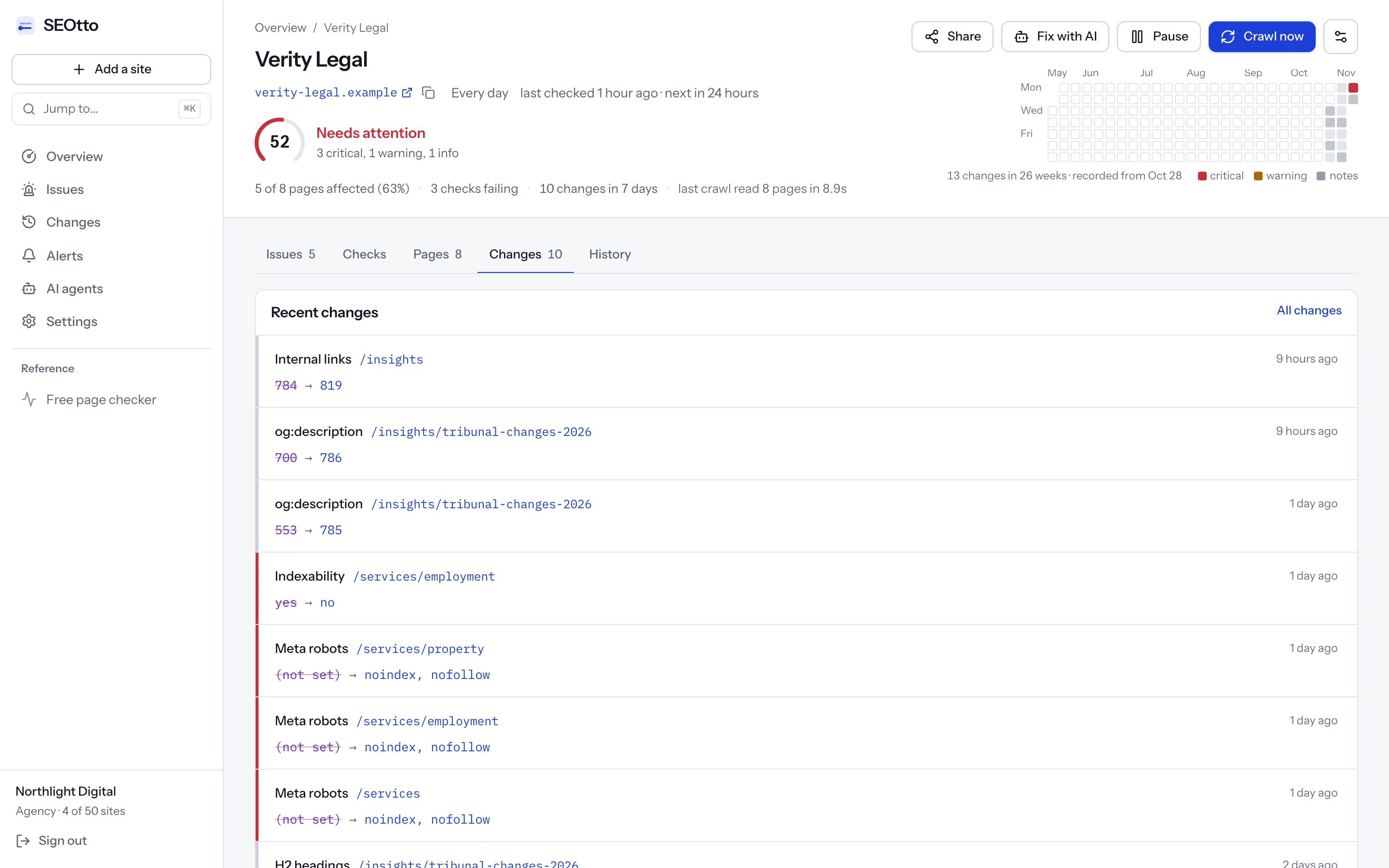
Where to look, platform by platform
| Platform | What can add a noindex | What it outputs |
|---|---|---|
| WordPress | Settings → Reading → “Discourage search engines from indexing this site”. Since WordPress 5.3 this no longer writes Disallow: / into robots.txt. | A robots meta tag with noindex, nofollow on every page |
| WordPress SEO plugins | A per-post setting, and a setting per content type or taxonomy | A robots meta tag on the pages it covers |
| Shopify | The theme's code or an app. Search the theme files for noindex. | Whatever the theme or app writes, usually a meta tag |
| Next.js | robots: { index: false } in the metadata of a page or a layout | A robots meta tag. In a layout it applies to every page under that layout. |
| Vercel | Preview deployments. Vercel adds the header to every one of them automatically, unless a custom domain is assigned to that branch. | X-Robots-Tag: noindex |
| nginx | add_header X-Robots-Tag "noindex"; in a server or location block | The header, on every response that block serves |
| Apache | Header set X-Robots-Tag "noindex" in the config or an .htaccess file | The header, for that directory and below |
| Any CDN | A rule or edge function that sets response headers, often written for a staging hostname | The header, on whatever the rule matches |
do_robots and wp_robots_no_robots; Vercel from its knowledge base article on preview deployments; Next.js from its metadata API reference.How a staging noindex reaches production
Staging sites are noindexed on purpose, and that should stay. The failure is in how the code decides which environment it is in. These are the three routes that come up again and again in practice.
- A variable that isn't set. The template adds noindex unless
APP_ENVisproduction. The new production server doesn't setAPP_ENVat all, the check falls back to its default, and every page ships with a noindex. Nothing errors, because a missing variable is not an error. - Config frozen at build time. Some frameworks bake configuration into the build. If the build ran with staging's settings, production serves staging's answer whatever its own environment says.
- A header rule copied across. Somebody adds
X-Robots-Tag: noindexat the CDN for the staging hostname. Later the rule is copied to production, or written for a path instead of a hostname. It never appears in the repository or in view-source.
How do I remove it and get the pages back?
Fix the setting that adds it
Change the setting, template, config or rule that adds the noindex. A page edited by hand gets the directive back from its template on the next deploy.
Purge the caches
A CDN or page cache can keep serving the old headers and HTML after the fix. Purge it, then test again.
Test the live page again
Run the two curl commands, or the URL Inspection live test, on a few pages from different sections. Both the header and the tags have to be clean.
Ask Google to recrawl the pages that matter most
In URL Inspection, choose Request indexing for your most important URLs. There is a daily limit per property, so save it for the pages that earn traffic.
Resubmit the sitemap and validate the fix
For many pages, resubmit the sitemap in the Sitemaps report. Then go back to the noindex row in the Page indexing report and choose Validate fix, which makes Google check the affected URLs.
| What you did | What Google does | How long, in Google's words |
|---|---|---|
| Request indexing on a URL | Adds the URL to its crawl queue | No time given. Google says a request does not guarantee the page will be indexed. |
| Validate fix in the report | Re-checks the URLs listed under the issue | “Typically takes up to about two weeks, but in some cases can take much longer” |
| Nothing | Recrawls each page on its own schedule | “Depending on the importance of the page on the internet, it may take months for Googlebot to revisit a page” |
Why didn't anything warn us?
A noindexed page is not broken. It answers 200, renders and loads quickly. Only its place in Google changes.
Pages already in the index don't disappear the moment the directive appears. Each one goes when Google next crawls it. Pages Google visits often, such as the home page and the main categories, go within days. Deep pages can stay for weeks or months. So the traffic chart doesn't drop on the day of the deploy. It leans, a little more each week, and by the time the shape is clear the deploy that caused it is many releases back.
After the deploy that added noindex
illustration
Home page
Top categories
Popular articles
Product pages
Older posts
Deep archive
The fix is to check for the directive at the moment it can arrive, which is after a deploy or a configuration change, rather than after the traffic has gone. A small script in the deploy pipeline does it for a list of important URLs:
#!/usr/bin/env bash
# Fails when any URL in urls.txt carries a noindex in its header or its meta tags.
status=0
while read -r url; do
  [ -z "$url" ] && continue
  response=$(curl -s -i "$url")
  if printf '%s' "$response" | grep -qiE '^x-robots-tag:.*(noindex|none)'; then
    echo "noindex header:   $url"; status=1
  fi
  if printf '%s' "$response" | grep -Eio "<meta[^>]*name=[\"']?(robots|googlebot)[\"']?[^>]*>" | grep -qiE 'noindex|none'; then
    echo "noindex meta tag: $url"; status=1
  fi
done < urls.txt
exit $status
The script only knows the URLs you give it and runs only when the pipeline does. It also flags a tag inside an HTML comment, which no crawler reads; that is the safe mistake to make. A header rule changed in a CDN dashboard, with no deploy at all, gets past it. That is the case a scheduled check covers: the noindex checker reads the header and the tags on every page of the site on every crawl, and sends a critical alert when a page turns noindex.
Questions
- Is “Excluded by ‘noindex’ tag” an error?
- No. It is Search Console telling you what it found. It only needs fixing when the listed pages are ones you want people to find in Google.
- How long until a page comes back after I remove the noindex?
- Until Google crawls it again and indexes it. Request indexing in URL Inspection speeds this up for single pages. For pages Google rarely visits, its documentation says a revisit can take months, which is why a resubmitted sitemap and Validate fix are worth doing too.
- URL Inspection says indexing is allowed, but the report still lists the page. Why?
- The report shows what Google saw on its last crawl, and the live test shows the page now, so a fixed page stays in the report until it is recrawled. The other cause is robots.txt: when it blocks the URL, “Indexing allowed?” always says Yes, because Google can't see the page. Check “Crawl allowed?”.
- Can I put noindex in robots.txt instead?
- No. Google does not support it. A
Disallowrule also stops Google from seeing a noindex on the page, so the URL can stay indexed from links. Use the meta tag or the header. See the robots.txt guide. - Does Google read a robots tag that JavaScript adds or removes?
- Google renders JavaScript, but its robots meta tag documentation makes no promise about directives changed by scripts. Put the directive you mean in the HTML the server sends, and don't rely on a script to remove one.
- Does a noindex also keep the page out of Bing?
- The
robotsmeta tag and anX-Robots-Tagheader without a user agent apply to every crawler that reads them, Bing included.<meta name="googlebot">andX-Robots-Tag: googlebot:apply to Google only, which is how a page ends up in Bing and missing from Google. - What is the difference between noindex and nofollow?
noindexkeeps the page out of search results.nofollowtells the crawler not to follow the links on the page.noneis both at once.
Sources
- Block search indexing with noindex, Google Search Central
- Robots meta tag, data-nosnippet and X-Robots-Tag specifications, Google Search Central
- Page indexing report, Search Console Help
- URL Inspection tool, Search Console Help
- wp_robots_no_robots(), WordPress code reference
- do_robots(), WordPress code reference
- Are Vercel preview deployments indexed by search engines?, Vercel
- generateMetadata and the robots field, Next.js
Checked against these pages on 3 November 2026.
Written by
Suleyman
Suleyman builds SEOtto: the crawler, the checks it runs and the alerts it sends. The guides describe the same failures the checks look for, with the commands he uses to confirm them by hand.